
Most marketers open a separate AI tab to write, then copy the output back into the tool where the work actually lives. That copy-paste loop is where the time goes. Google Gemini removes it, because Gemini already sits inside Search, Sheets, Docs, Gmail, Slides, and Google Ads, which is where a marketer spends most of the day.
I run echoVME Digital, where my team has managed roughly Rs 400 crore of cumulative ad spend across 500+ brands. I also co-founded Digital Scholar, where we train more than 1,000 students a year in a 4-month AI and digital marketing program. Gemini is now part of both. Not because it is the smartest model on a leaderboard, but because it is the model that lives inside the Google tools we already work in.
Let me be blunt. I do not care which model wins a benchmark this month. I care which model saves my team hours without adding a new tab. For Google-native work, that model is Gemini. This guide is how I use Gemini for digital marketing, what it is genuinely good at, where I still reach for ChatGPT or Claude, and the exact workflow I teach at Digital Scholar.
By the end of this guide you will know how to use Google Gemini for digital marketing across Search, Sheets, Docs, Gmail, Slides, and Google Ads. You will get my named workflow, the Gemini Native Loop, a task-by-task comparison of Gemini vs ChatGPT vs Claude, a prompting checklist that makes Gemini output usable, and the specific things I tested and threw out.
TL;DR (the 30-second version). Google Gemini is Google’s AI assistant, and its edge for marketers is not raw intelligence. It is location. Gemini runs inside Google Workspace and Google Ads, so it acts on the data and documents you already have instead of forcing a copy-paste loop. Use it for research grounded in live Search, for crunching campaign exports in Sheets, for first-draft copy in Docs, for outreach in Gmail, and for deck-building in Slides. The free tier covers most individuals. Paid Google AI plans unlock the strongest reasoning model, higher limits, and Deep Research. My rule at echoVME: use Gemini for anything that touches Google data, use ChatGPT for open ideation, and use Claude for long structured documents and code. Who this is for: marketers, founders, and students who already live in Google Workspace and want AI inside those tools, not beside them.
- Why listen to me on Gemini for marketing
- What Google Gemini actually is in 2026
- Gemini vs ChatGPT vs Claude for marketing tasks
- The Gemini Native Loop: my 5-station workflow
- Gemini in Google Search for SEO and AEO
- Gemini in Google Sheets: the data-crunching play
- Gemini in Docs and Gmail: copy and outreach
- Gemini for Google Ads: what it does, what to watch
- Gemini for images and video
- How I prompt Gemini: the grounding checklist
- What I tested and rejected
- A 30-day plan to put Gemini to work
- FAQ
Why listen to me on Gemini for marketing
I am not writing this from a demo account. At echoVME Digital, Gemini touches live campaigns every week, and at Digital Scholar it is part of how we teach more than 1,000 students a year to work with AI, not around it.
Here is the context that matters. echoVME has managed roughly Rs 400 crore of cumulative ad spend across 500+ brands. That means we have a lot of raw campaign data sitting in Google Sheets, a lot of client reporting in Google Docs and Slides, and a lot of daily email in Gmail. Gemini lives in all of those. So when I say Gemini saves time, I mean I have watched a media buyer stop exporting a report into a separate chat window and instead ask Gemini to summarize the Sheet it is already looking at.
I will also be honest about the limits. Gemini did not replace anyone on my team. It removed the boring middle of a task, the copy-paste and the first draft, and it left the judgment with the human. That is the only way I recommend using it. If you want the wider view of where every tool fits, I keep a running list in my guide to the best AI tools for digital marketing, and this post is the deep dive on the Google side of that stack.
What Google Gemini actually is in 2026
Google Gemini is Google’s family of AI models and the assistant built on top of them. For a marketer, the important part is not the model name. It is that Gemini is multimodal, meaning it reads text, images, audio, and code, and that it is wired directly into Google Search and Google Workspace, so it can work on the files and data you already keep in Google.
You meet Gemini in three main places. First, inside Google Search, where it powers AI Overviews and the conversational AI Mode. Second, inside the Gemini app and website as a standalone chat. Third, inside Google Workspace, where it appears as a side panel in Docs, Sheets, Gmail, and Slides, and inside Google Ads as built-in assistive features. Same brain, different doorways.
On plans, keep it simple. The free tier is enough for most individuals and covers everyday drafting, research, and analysis. Paid Google AI plans (marketed as Google AI Plus, Pro, and Ultra) raise the usage limits, unlock the strongest reasoning model, add Deep Research for long multi-source reports, and bundle more storage. At echoVME we run paid seats for the team that does heavy reporting and free seats for everyone else. Start free. Upgrade only when you hit a wall on limits or you specifically need Deep Research.
A note on versions. Google renames models and reshuffles plan tiers often. The exact model version and price on the day you read this may differ from the day I wrote it. The capabilities in this guide (Workspace integration, Search grounding, Sheets analysis, Deep Research) are stable. The version numbers are not, so check the current Gemini plan page before you buy.
Gemini vs ChatGPT vs Claude for marketing tasks
The honest answer is that you should use all three, and pick by task, not by loyalty. Gemini wins when the work touches Google data. ChatGPT wins for open, wide-ranging ideation and a large plugin ecosystem. Claude wins for long, structured documents and clean code. Here is the task-by-task split I actually use at echoVME.
| Marketing task | Best pick | Why |
|---|---|---|
| Research grounded in live web | Gemini | Built into Google Search, cites current sources through AI Mode |
| Analyzing a campaign export | Gemini | Runs on the Sheet you already have open, no export or paste |
| Client reporting decks | Gemini | Generates and edits directly inside Google Slides |
| Cold and warm email at scale | Gemini | Drafts inside Gmail with thread context |
| Big open brainstorm | ChatGPT | Widest ideation range, strong for angles and hooks |
| Long structured guides and SOPs | Claude | Holds structure across thousands of words |
| Code, scripts, automations | Claude | Cleanest code and best at following spec |
| Fast image drafts with text | Gemini | Native image generation reads and renders short headlines |
If you want the full ChatGPT side of this, I wrote the companion piece on how to use ChatGPT for digital marketing, and for the Claude workflows my team runs, see how I replaced 5 hours of daily agency work with Claude routines. Read all three and you have the practitioner map of the whole assistant layer.
The key insight: Gemini’s advantage is not that it is smarter. It is that it is already standing inside the tools where marketing work happens, so it removes the tab-switching tax that quietly eats an hour a day.
The Gemini Native Loop: my 5-station workflow
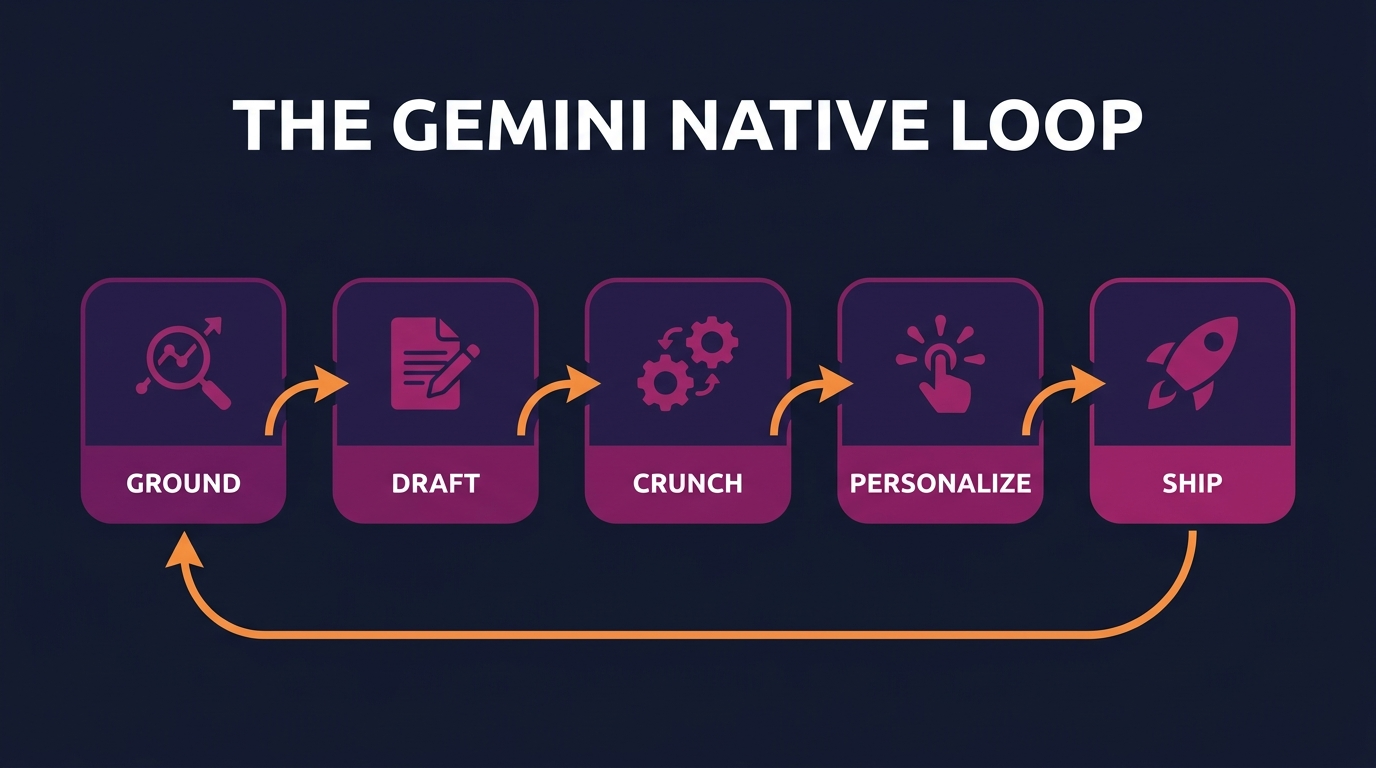
The Gemini Native Loop is the workflow I teach at Digital Scholar for running a full marketing task without leaving Google. It has five stations, and the whole point is that Gemini stays with you the entire time instead of you carrying data out to a separate tab and back. Ground, Draft, Crunch, Personalize, Ship. Then loop.
Station 1: Ground
Start in Google Search AI Mode or the Gemini app and ground your task in current reality. Ask for the live landscape: what competitors rank for your topic, what questions people ask, what the current best practice is. Because Gemini is wired into Search, this step pulls from the live web instead of a stale training cutoff, which matters when you are researching a fast-moving topic.
Station 2: Draft
Move to Google Docs and open the Gemini side panel. Turn the grounded research into a first draft: a blog outline, ad copy variants, a landing page skeleton. This is a first draft, not a final. At echoVME the rule is that a human owns the edit. Gemini gets you to 60% in minutes so the team spends its time on the 40% that actually wins.
Station 3: Crunch
Drop your campaign export into Google Sheets and ask Gemini to read it. Summaries, pivot logic, formula suggestions, outlier flags. This is the station that saves my media buyers the most time, because the old workflow was export, paste into a chat, describe the columns, then trust an answer about data the model could not actually see. Now Gemini reads the Sheet in place.
Station 4: Personalize
Move to Gmail and use Gemini to personalize outreach at scale. It reads the thread context, so a follow-up to a warm lead sounds like a reply, not a template. We use this for client updates and for the Digital Scholar admissions team, and the win is speed with a human tone, not a robotic blast.
Station 5: Ship
Finish in Google Slides or Google Ads. Turn the analysis into a client deck, or take the copy into the ad platform. Then loop back to Ground for the next task. The Native Loop is not magic. It is discipline. It keeps one assistant with you across five tools so you stop paying the copy-paste tax on every step.
The key insight: Do not judge Gemini as a chatbot. Judge it as a layer that runs across your Google tools. The value shows up in the Loop, not in a single clever prompt.
Gemini in Google Search for SEO and AEO
Gemini inside Google Search changes both how you research and how you get found. On the research side, AI Mode lets you ask a full question and get a grounded answer with sources, which is faster than scanning ten blue links. On the visibility side, AI Overviews now sit at the top of many results, and that is the new front page you are competing for.
This is why answer engine optimization matters. At Digital Scholar we write every blog post to be quotable by an AI answer, not just rankable. That means a direct answer in the first 40 to 60 words of each section, real numbers, and a clear FAQ. You are reading one right now. The structure of this post, the TL;DR up top and the self-contained sections, is built so an AI Overview can lift a clean answer from it and cite Digital Scholar.
Use Gemini to pressure-test your own pages. Ask it what question a page answers, whether the answer is clear in the first paragraph, and what a competitor covers that you miss. It is a fast content-gap audit. For the fuller SEO picture, our breakdown of performance marketing vs digital marketing in India shows how we structure cornerstone content that both Google and AI answers can reward.
Gemini in Google Sheets: the data-crunching play
Gemini in Google Sheets is the single feature that changed my team’s day the most. You export a campaign report, drop it in a Sheet, and ask questions in plain English. Which ad set has the best cost per lead. Where did frequency spike. Build a weekly pivot. It reads the actual cells, so the answer is about your data, not a guess.
Directionally, a weekly performance readout that used to take a media buyer most of an afternoon now takes roughly 20 to 30 minutes, because Gemini does the first summary and flags the outliers and the human validates instead of building from a blank Sheet. I am hedging that number on purpose. It varies by account size and how clean the export is. But the direction is not in doubt.
| Sheets task | Old workflow | With Gemini in Sheets |
|---|---|---|
| Weekly performance summary | Manual scan, write notes by hand | Ask for the summary, then verify |
| Find the formula | Search online, adapt, debug | Describe the goal, get the formula |
| Spot outliers | Eyeball columns, easy to miss | Ask it to flag anomalies |
| Build a pivot | Set up rows, columns, values manually | Describe the cut you want |
One warning. Always check the math on anything that drives a budget decision. Gemini is excellent at speeding up the readout and terrible as an excuse to stop thinking. Treat its Sheets answers as a fast first pass by a smart junior, not as a signed-off audit. This is exactly the discipline we teach in the Digital Scholar course modules on analytics.
Gemini in Docs and Gmail: copy and outreach
In Google Docs, Gemini is a first-draft engine. Give it your grounded research and a brief, and it produces an outline or a draft you then rewrite in your voice. The mistake I see students make is publishing the first draft. Do not. Gemini gets you past the blank page, and the human earns the rankings with edits, examples, and real numbers.
In Gmail, Gemini drafts and refines email using the thread it is sitting in. That thread context is the difference between a reply that reads like a human and a template that reads like spam. At echoVME we use it to speed up client updates and proposals, and the Digital Scholar admissions team uses it to answer common questions faster without losing a warm, personal tone.
Here is my imperfect truth. We still write the important emails ourselves. A high-stakes proposal or a sensitive client conversation does not go out on a Gemini draft. AI handles the volume so humans can spend attention where the money and the relationship actually are. If you want the mindset behind that split, my piece on running Meta Ads from the terminal with Claude Code shows how far I am willing to automate and where I stop.
Gemini for Google Ads: what it does, what to watch
Inside Google Ads, Gemini shows up as assistive features: conversational campaign setup, asset and headline suggestions, and help interpreting performance. For a beginner it lowers the barrier to launching a clean campaign. For a pro it speeds up the boring parts of asset creation. Useful, but with a firm boundary.
The boundary is this: let Gemini assist with assets and analysis, never hand it the strategy. The account structure, the budget logic, the audience decisions, and the profit math stay with a human who understands the business. AI-generated assets that go live without review are how you burn budget on generic creative. I make the same argument for Meta in my guide to AI creative for Meta Ads, and the rule is identical on Google.
If you are choosing where to spend at all, that is a strategy question before it is a tool question. Our comparison of Meta Ads vs Google Ads for Indian D2C walks through how we decide channel mix, and Gemini is an assistant inside that decision, not the decision-maker.
Gemini for images and video
Gemini’s native image generation is strong for marketing because it can read and render short headline text inside an image without garbling it, which most image models still struggle with. For quick ad mockups, thumbnail concepts, and infographic drafts with a few words on them, it is fast and usable. The visuals in many Digital Scholar posts are produced with Google’s image models in exactly this way.
Two rules keep it useful. First, keep the text you want rendered short and quote it exactly, because long strings still break. Second, always read the output before you ship it, checking spelling and that no extra text crept in. For video, Google’s models can generate short clips, and they are genuinely good for concept and B-roll, but a real creator still beats them on anything that needs a human face and a real story. Honestly, the AI clips are about 70% of the way there for the kind of quick social content where speed matters more than polish.
How I prompt Gemini: the grounding checklist
Gemini rewards specificity, and it rewards giving it real material to work from even more. A vague prompt gets a generic answer. A prompt with your data, your brand voice, and a clear output format gets something you can actually use. Here is the checklist I teach at Digital Scholar for every Gemini prompt that matters.
| Element | Weak prompt | Strong prompt |
|---|---|---|
| Role | “Write ad copy” | “You are a performance marketer for a D2C skincare brand in India” |
| Real data | No context | Point it at the Sheet, Doc, or thread it should use |
| Goal | “Make it good” | “Goal is more qualified leads at a lower cost per lead” |
| Format | Unspecified | “Give me 5 variants, each under 30 words, in a table” |
| Brand voice | Generic | Paste 2 examples of your best past copy to match |
| Verify | Trust blindly | “List any numbers you assumed so I can check them” |
The last row is the one people skip and the one that saves you. Asking Gemini to surface its assumptions turns a black box into something you can audit. When a number is going into a client report or a budget, that one line is the difference between a fast draft and a confident decision. Prompting is a teachable skill, and it is a core part of what we cover in the Digital Scholar online digital marketing course.
What I tested and rejected
Not everything worked. Here is what my team tried with Gemini and stopped doing, so you do not waste the same weeks we did.
- Full blog posts start to finish. The output ranks for a few months, then fades. Same lesson as every other model. Use Gemini for the draft, keep the human for the edit and the real examples.
- Letting Gemini own Google Ads strategy. Great at assets, not at judgment. We kept the assistive features and took back the account structure and budget decisions.
- Trusting Sheets math on autopilot. Fast and mostly right, but “mostly” is not good enough for a budget. We now verify every number that drives a decision.
- Long, unstructured strategy documents. Gemini is fine here, but for a 4,000-word structured playbook I still prefer Claude, which holds the structure better. Right tool, right job.
The pattern across all four is the same. Gemini is a force multiplier on execution and a poor substitute for judgment. Once your team internalizes that line, it becomes one of the most useful tools in the stack. Cross the line and it quietly costs you money.
A 30-day plan to put Gemini to work
Do not try to adopt everything at once. This is the ramp I give Digital Scholar students and new echoVME hires, one habit a week for four weeks.
- Week 1, Ground. Replace your first research step with Gemini in Google Search AI Mode. Get used to grounded answers with sources before you write anything.
- Week 2, Crunch. Move one recurring report into Google Sheets and let Gemini do the first summary. Verify every number. This is where you feel the time saved.
- Week 3, Draft and Personalize. Use the Docs side panel for first drafts and the Gmail assist for follow-ups. Rewrite everything in your own voice before it goes out.
- Week 4, Ship the Loop. Run one full task end to end through all five stations of the Gemini Native Loop. That is the moment it clicks from a chatbot into a workflow.
Four weeks, four habits. By the end you will not think of Gemini as a tab you open. You will think of it as a layer that is always there inside the tools you already use. That shift is the whole game.
Want to learn the whole AI marketing stack, not just one tool?
Gemini, ChatGPT, Claude, Meta Ads, Google Ads, SEO, and AEO, taught hands-on. The Digital Scholar 4-month AI and digital marketing program trains more than 1,000 students a year to run real campaigns with AI in the loop.
FAQ: Google Gemini for digital marketing
Is Google Gemini free for marketers?
Yes, the free tier covers most individual marketers for everyday drafting, research, and analysis. Paid Google AI plans (Plus, Pro, and Ultra) add higher usage limits, the strongest reasoning model, and Deep Research for long multi-source reports. At echoVME we buy paid seats only for the team doing heavy reporting and keep everyone else on free. Start free and upgrade when you hit a real wall.
Is Gemini better than ChatGPT for digital marketing?
Neither is simply better. They are better at different jobs. Gemini wins when work touches Google data, because it lives inside Search, Sheets, Docs, Gmail, and Slides. ChatGPT wins for wide-open ideation. At echoVME we use both and pick by task. If you already work in Google Workspace all day, Gemini removes the most friction, so it is usually the better default there.
What are the best marketing tasks for Gemini?
The strongest use cases are research grounded in live Search, analyzing campaign exports in Google Sheets, first-draft copy in Docs, personalized outreach in Gmail, and building client decks in Slides. In short, anything that already lives inside a Google tool. That is where Gemini removes the copy-paste loop and saves the most time, which is the whole idea behind the Gemini Native Loop workflow above.
Can Gemini help with SEO and getting into AI Overviews?
Yes, in two ways. Use Gemini to research topics, audit your pages for clarity, and find content gaps against competitors. To actually appear in AI Overviews, write answer-first content: a direct answer in the first 40 to 60 words of each section, real numbers, and a clean FAQ. At Digital Scholar we structure every post this way so AI answers can lift a clear quote and cite us.
Should I let Gemini run my Google Ads campaigns?
Let it assist, not decide. Gemini is genuinely helpful for asset and headline suggestions and for interpreting performance inside Google Ads. Keep account structure, budget logic, audience choices, and profit math with a human. At echoVME we have managed roughly Rs 400 crore of ad spend, and the accounts that do well pair AI assistance with human strategy. AI-generated assets that go live unreviewed are how budgets get wasted.
Is my client data safe when I use Gemini in Workspace?
For business use, run Gemini through a paid Google Workspace or Google AI business plan and read the current data terms, which generally state that Workspace content is not used to train models for enterprise customers. Do not paste sensitive client data into a personal free account. This is a policy that changes, so at echoVME we check the current terms before onboarding any new client data into any AI tool.
Can Gemini generate marketing images with text on them?
Yes, and this is a real strength. Gemini’s image generation can render short headline text inside an image reasonably cleanly, which most image models still get wrong. It works well for ad mockups, thumbnails, and infographic drafts. Keep the text short, quote it exactly, and always read the output for spelling before you ship. Many Digital Scholar blog visuals are produced this way.
How do I learn to use Gemini for marketing properly?
Start with the 30-day ramp in this guide, one habit a week. If you want the structured version with feedback, the Digital Scholar 4-month program teaches the full AI marketing stack hands-on, including Gemini, on real campaigns. You can also read our companion guides on how to learn performance marketing and how to become a performance marketer in India to see how AI fits the wider skill path.
One last thing. Choosing the right program matters as much as choosing the right tool, so if you are weighing options, my 10-point filter for choosing a digital marketing course will save you from the wrong one. The tools change every few months. The skill of knowing when to trust them, and when not to, is what lasts.