
I have onboarded more than 500 brands into a Meta Business Portfolio at echoVME Digital. In 12 years of running paid social, the single most expensive mistake I keep seeing is not a bad creative or a wrong objective. It is a broken ownership structure.
Here is the pattern. An agency builds an ad account inside its own Business Manager, runs the client’s campaigns for 18 months, then the relationship ends. The client walks away with nothing. No ad account, no Pixel data, no custom audiences, no creative history. They rebuilt from zero. I have watched brands lose 2 to 3 years of first-party data this way, which at echoVME we value at more than the monthly retainer itself.
This guide fixes that. Meta renamed Business Manager to the Meta Business Portfolio, and the rename is not cosmetic. It reflects a shift toward asset ownership and partner access as the core of the system. I will show you how to set up a Meta Business Portfolio the way an agency should, so ownership stays clean, access stays scoped, and offboarding takes 10 minutes instead of 10 emails.
In this guide you will learn how to set up a Meta Business Portfolio for agency work: who should own each asset, how to grant partner access without handing over your login, the Own-Assign-Audit-Offboard governance loop we run at echoVME, business verification, and a clean offboarding checklist. This is Cluster 6 of the Digital Scholar Meta Ads system, built around Rishi Jain’s echoVME playbook.
- Meta Business Portfolio vs Business Manager: what changed
- Why listen to me on agency ownership
- The Meta Ownership Map: who owns what
- The Own-Assign-Audit-Offboard governance loop
- How to create a Meta Business Portfolio
- Partner access: the right way to onboard a client
- Roles and permissions without over-granting
- Business verification and why it matters
- The clean offboarding checklist
- Five ownership mistakes that cost real money
- Frequently asked questions
Meta Business Portfolio vs Business Manager: what changed
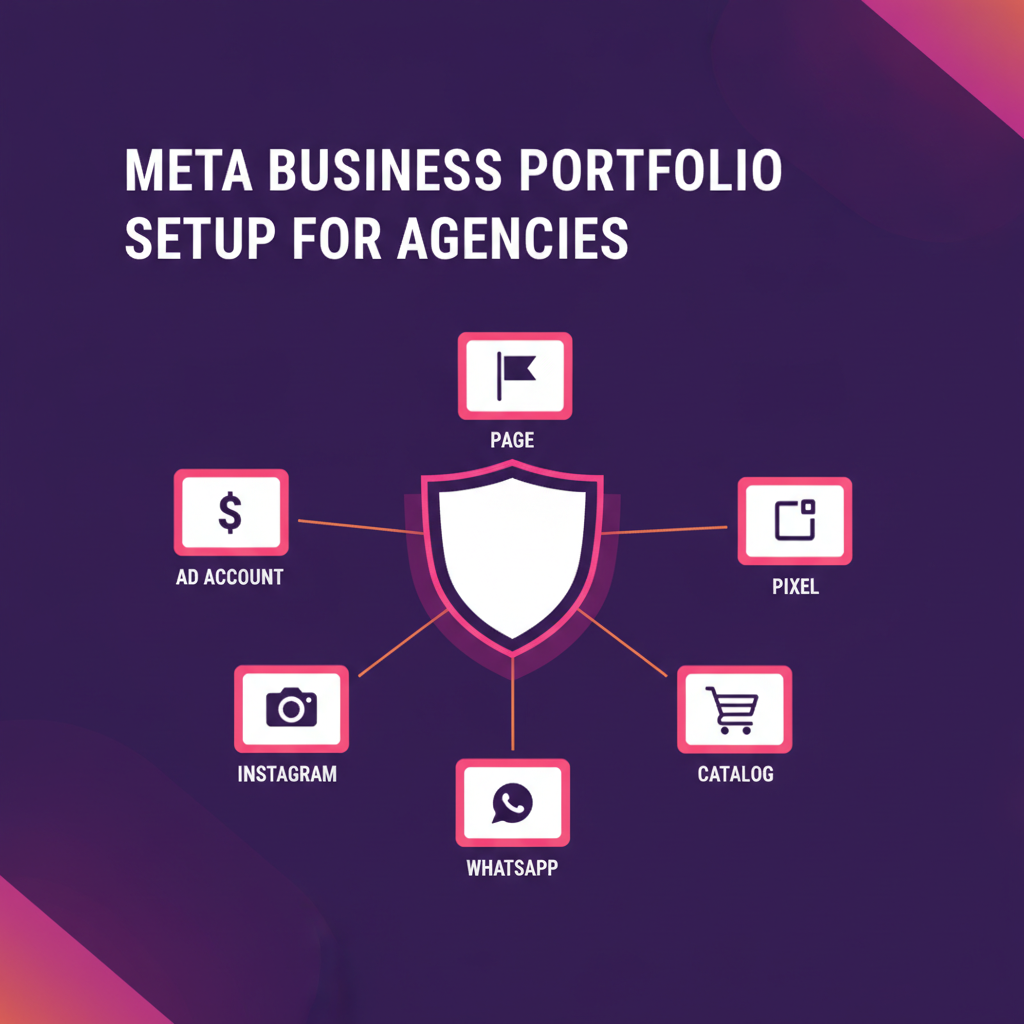
The Meta Business Portfolio is the renamed and restructured version of what you knew as Facebook Business Manager. It is the container that holds your ad accounts, Pages, Instagram accounts, Pixels, catalogs, and the people who can touch them. The name changed, the URL still resolves through business.facebook.com, and the core job is the same: separate business assets from personal profiles.
The keyword data tells you how confused people still are. In India, “facebook business manager” pulls 27,100 searches a month and “meta business manager” pulls 14,800, while “meta business portfolio” is still an emerging term with low competition (0.22). That gap is the opportunity. Most brands and even many agencies are running 2021 mental models on a 2026 system.
The practical difference for an agency is the emphasis on partner access. In the old flow, agencies often built the client’s ad account inside their own manager. The Business Portfolio structure pushes you toward a cleaner model: the client owns their portfolio, the agency owns its own, and access is shared between the two through partner links. If you are still setting up the basics, our step-by-step Meta Business Manager setup guide covers the beginner flow. This post is the layer above it, the governance layer.
Why listen to me on agency ownership
I run echoVME Digital, an agency that has worked with more than 500 brands and managed a cumulative ad spend of around Rs 400 crore. I also co-founded Digital Scholar, where we train over 1,000 students a year in AI and digital marketing across a 4-month program.
That combination matters here. At echoVME I have onboarded and offboarded hundreds of clients, so I have felt the pain of a broken ownership structure with real money attached. At Digital Scholar I have to explain this cleanly enough that a student who has never opened a Meta Business Portfolio can set one up correctly on their first client. This guide is the same structure I hand to both a new echoVME account manager and a Digital Scholar student.
Let me be honest about one thing. We still get this wrong sometimes. In 2023 we had 2 clients where the ad account sat inside echoVME’s portfolio instead of theirs, and the offboarding took 3 weeks each because we had to migrate Pixel data and rebuild custom audiences. That mistake is why the framework below exists. I built it so nobody on my team repeats it.
The Meta Ownership Map: who owns what
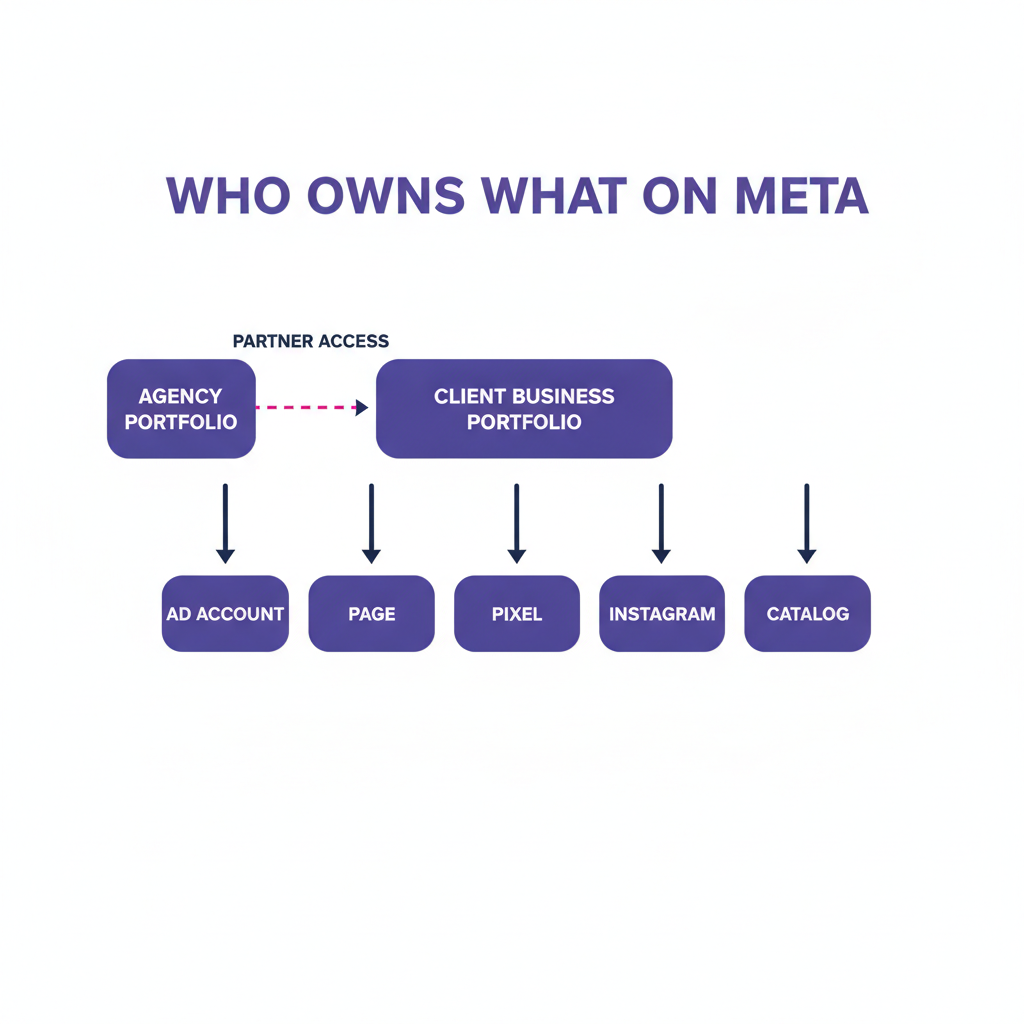
The Meta Ownership Map is the single decision that determines whether offboarding is clean or painful. The rule is simple: the client owns the assets that carry data and brand identity, and the agency owns only its own operating portfolio. Get this right on day one and everything downstream is easy.
Here is the map we use for every one of our 500-plus brand relationships. Every asset gets a clear owner, and the agency connects through partner access rather than ownership.
| Asset | Who should own it | Why | Agency gets |
|---|---|---|---|
| Ad account | Client portfolio | Spend history, learning, and billing must survive the relationship | Partner access, admin task |
| Meta Pixel / Dataset | Client portfolio | 2 to 3 years of conversion data is the most valuable asset on the account | Partner access, manage |
| Facebook Page | Client portfolio | Brand identity, followers, and reviews belong to the brand | Content and ads task |
| Instagram account | Client portfolio | Followers and DMs are owned audience, not agency property | Content and ads task |
| Product catalog | Client portfolio | Feed and product data map to the client’s store | Manage catalog |
| Creative library | Agency portfolio | Templates and processes are the agency’s IP | Owns fully, shares exports |
The key insight: if the client owns the ad account and the Pixel, you can end a relationship in 10 minutes by removing partner access. If the agency owns them, you are negotiating a data migration. Ownership decides the exit before the relationship even starts.
This is also why the Pixel matters so much. Your Meta Pixel and custom audiences are what power retargeting, and the longer a Pixel runs on one dataset, the smarter it gets. Reset that dataset and you throw away the signal that makes lower-funnel campaigns profitable.
The Own-Assign-Audit-Offboard governance loop
The Own-Assign-Audit-Offboard loop, or OAAO, is the governance system we run at echoVME so that access never drifts out of control. Most agencies do the first two steps and skip the last two, which is how you end up with 40 people who still have access to an account you stopped managing a year ago.
The four steps in practice
- Own. Decide the owner of every asset before you run a single ad, using the Meta Ownership Map above. This takes 15 minutes and saves weeks.
- Assign. Grant the minimum access needed for each person to do their job. A media buyer needs to manage campaigns. A designer needs creative access, not billing.
- Audit. Review who has access every 90 days. At echoVME this quarterly audit removed 60-plus stale user assignments across our client accounts in a single 2025 cleanup.
- Offboard. When a person leaves or a client relationship ends, revoke access the same day. Same-day offboarding is a policy, not a nice-to-have.
The OAAO loop is deliberately boring. It is a checklist, not a strategy. But in an agency that touches hundreds of accounts, boring and repeatable beats clever every time. This is the same operational discipline we teach when we cover Meta ads campaign structure, because structure at the account level and structure at the campaign level are the same skill.
How to create a Meta Business Portfolio
To create a Meta Business Portfolio, go to business.facebook.com, click Create Account, and enter your business name, your name, and a work email. Meta uses your personal Facebook profile only to authenticate you as an admin. The portfolio itself is a separate business container, and your personal profile is never exposed to clients or teammates.
Here is the sequence I give every new echoVME account manager and every Digital Scholar student. Do it in this order, because order prevents rework.
- Create the portfolio with the legal business name, not a nickname. Meta will check this during verification.
- Add your business details: address, website, and phone. This speeds up business verification later.
- Create or claim the ad account inside the correct portfolio. For agency work, the client creates theirs and shares it with you.
- Connect the Facebook Page and Instagram account.
- Set up the Meta Pixel or dataset before you spend a single rupee, so you never lose early conversion data.
- Add people with scoped roles, following the OAAO Assign step.
One number to anchor this: at Digital Scholar we teach that a clean portfolio setup done in this order takes about 30 minutes. A rushed setup that skips the Pixel step costs an average of 2 weeks of lost conversion data before someone notices. Do not skip step 5.
Partner access: the right way to onboard a client
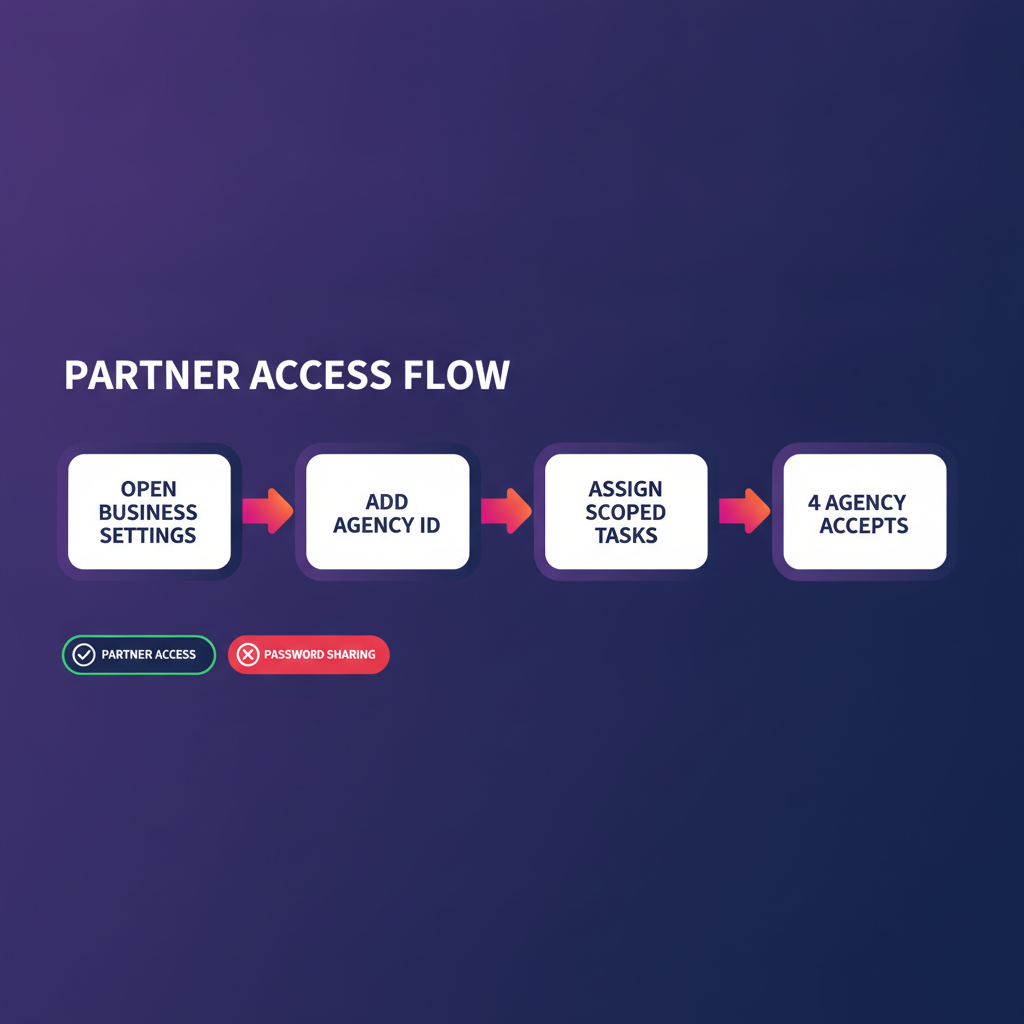
Partner access is how an agency gets into a client’s Meta Business Portfolio without owning it or sharing a password. The client shares specific assets with the agency’s Business ID, the agency accepts the request, and access can be revoked by either side at any time. This is the single most important agency skill in this entire guide.
How to give access to your Facebook Business Manager
To give an agency access, the client opens Business Settings, goes to Partners, clicks Add, and enters the agency’s Business ID. Then they select each asset (ad account, Page, Pixel) and assign a task-based permission level. The agency receives the request and accepts it. No login is ever shared.
| Method | What you share | Offboarding time | Risk level |
|---|---|---|---|
| Partner access (correct) | Business ID and scoped tasks | Under 10 minutes | Low |
| Add as individual user | Personal email invite | Per person, manual | Medium |
| Share login (never do this) | Full password | Requires password reset | High |
| Agency owns the account | Nothing, client owns nothing | Weeks, needs migration | Very high |
I will be blunt. If a client ever offers to share their Facebook password with you, decline it and walk them through partner access instead. At echoVME we have a zero-password-sharing policy across all 500-plus brands, and it has never once slowed down an onboarding. It has saved us from security incidents more than once.
Roles and permissions without over-granting
The rule for roles is least privilege: give each person the smallest permission that lets them do their job, and nothing more. Over-granting is the quiet risk in every agency, because it feels helpful in the moment and becomes a liability six months later when that person has left.
Meta splits access into full control and partial task access. For agency work, task-based access is almost always the right call. Here is the role map we run at echoVME and teach inside the Digital Scholar program.
| Role | Access level | Can do | Cannot do |
|---|---|---|---|
| Account lead | Admin task on ad account | Manage campaigns, budgets, reporting | Change portfolio ownership |
| Media buyer | Manage campaigns | Build and edit campaigns | Access billing details |
| Designer | Creative access | Upload and manage creatives | Launch or edit budgets |
| Analyst | View performance | Read dashboards and export | Edit anything live |
| Client stakeholder | Portfolio admin | Own everything, see all | N/A, they own it |
Notice that the client stakeholder is the only admin of the portfolio. The agency operates entirely through task access. That one design choice is what makes the offboarding checklist below take minutes. If you want to see how scoped access feeds directly into execution, our guides on choosing the right Meta ads objective and the learning phase budget math both assume the media buyer already has clean, scoped campaign access.
Business verification and why it matters
Business verification is Meta confirming that your business is a real, registered entity. You submit documents like a GST certificate or company registration, and Meta matches them against your portfolio details. Verification unlocks higher ad limits, advanced features, and the trust signals that keep an account out of the restriction loop.
For agencies, verification is not optional. An unverified portfolio hits lower spending caps and is more likely to get flagged during scaling. At echoVME we verify every client portfolio before we scale past a modest daily budget, because the last thing you want is a restriction landing in the middle of a profitable campaign. In our experience, verification takes 1 to 3 business days when the business name on the documents exactly matches the portfolio name.
The most common reason verification fails is a name mismatch. If your portfolio says “ABC Retail” and your GST says “ABC Retail Private Limited,” Meta may reject it. Match them exactly. This is why step 1 of the setup sequence insists on the legal business name.
The clean offboarding checklist
Clean offboarding means the client keeps everything and the agency loses access in one session. If you built ownership correctly, this is a 10-minute task. If you did not, it becomes a data migration that can stretch across weeks. The whole point of this guide is to make the first outcome the only outcome.
- Confirm the client is the portfolio admin and owns the ad account, Pixel, Page, and Instagram account.
- Export any agency-owned creative and reporting the client is entitled to keep.
- Have the client remove the agency’s partner access under Business Settings, Partners.
- Remove any individual agency users still assigned to the account.
- Confirm billing is on the client’s payment method, not the agency’s, so spend never lands on your card.
- Document the handover date and who confirmed it. We log this in the client record the same day.
The key insight: a client should be able to fire you and lose nothing. That sounds like a strange thing for an agency to optimize for, but it is exactly why our echoVME clients trust us with an average tenure well above the industry norm. Clean exits build long relationships.
Five ownership mistakes that cost real money
These are the five mistakes I see most often, ranked by how much they cost when they blow up. Every one of them traces back to a shortcut taken during setup.
- Agency owns the ad account. The client loses spend history and learning at exit. This is the single most expensive mistake, worth 2 to 3 years of Pixel data.
- Sharing a login instead of partner access. One password reset locks everyone out, and a departed employee keeps access until someone remembers to change it.
- Never auditing access. Stale users pile up. Our 2025 cleanup found 60-plus stale assignments that should have been removed months earlier.
- Skipping business verification. You hit spending caps mid-scale and lose momentum on a winning campaign.
- Billing on the agency card. When the relationship ends, untangling billing is messy and sometimes leaves the agency paying for spend it cannot recover.
Fix these five and your Meta Business Portfolio governance is ahead of most agencies operating in India today. If you want the full picture of how account governance connects to actual campaign performance, read our comparison of Meta ads vs Google ads for Indian D2C and our breakdown of the Facebook retargeting custom audience ladder, both of which depend on clean Pixel ownership.
Want to run Meta Ads like an agency, not a hobbyist?
The Digital Scholar 4-month AI and Digital Marketing program teaches this exact governance system, plus the full Meta Ads stack we run at echoVME across 500-plus brands. Over 1,000 students a year learn it hands-on.
Frequently asked questions
How do I create a Facebook Business Manager account?
Go to business.facebook.com, click Create Account, and enter your legal business name, your name, and a work email. Meta uses your personal Facebook profile only to authenticate you as an admin. For agency work, create your own portfolio and let each client create theirs, then connect through partner access. Use the exact legal business name so verification does not fail later.
How do I give an agency access to my Facebook Business Manager?
Open Business Settings, go to Partners, click Add, and enter the agency’s Business ID. Then select each asset (ad account, Page, Pixel) and assign task-based permissions. The agency accepts the request. You never share a password, and you can revoke access at any time. This is the method we insist on across all 500-plus brands we manage.
How do I find my Facebook Business Manager ID?
Open Business Settings and look at Business Info, where your Business ID is listed as a long number. You can also read it from the URL when you are inside your portfolio. Agencies need this ID to accept partner requests, so keep it handy in your onboarding document. It is safe to share the ID itself, unlike a login.
How do I accept a Facebook Business Manager partner request?
When a client shares assets with your Business ID, the request appears under Business Settings in the Requests or Partners area. Open it, review the assets and permission levels offered, and accept. If you do not see it, ask the client to confirm they used your correct Business ID. We confirm the ID on a call before the client sends the request, which avoids most delays. This is standard practice for every Digital Scholar student we train on client onboarding.
How do I remove an agency from my Facebook Business Manager?
Go to Business Settings, Partners, select the agency, and remove their access. This revokes every asset in one action. Then check the People section for any individual agency users and remove them too. If ownership was set up correctly, you keep the ad account, Pixel, Page, and all data. This is why we hand every client a clean offboarding checklist at Digital Scholar.
How do I verify my business on Meta?
Open Business Settings, go to Security Center, and start business verification. Submit documents like your GST certificate or company registration, and make sure the business name matches your portfolio name exactly. Verification usually takes 1 to 3 business days. It unlocks higher spending limits and reduces the chance of restrictions when you scale, which is why we verify every client portfolio before scaling and cover it in the Digital Scholar curriculum.
Should the agency or the client own the ad account?
The client should own the ad account and the Pixel, always. Spend history, learning, and 2 to 3 years of conversion data are too valuable to lose at the end of a relationship. The agency connects through partner access. At echoVME this is a non-negotiable, and it is the single biggest predictor of a clean offboarding when a relationship ends.
How do I delete a Meta Business Portfolio?
Go to Business Settings, Business Info, and choose Permanently Delete Business. Before you do, move any ad accounts, Pages, or Pixels you want to keep to another portfolio, because deletion is permanent. For agencies, you rarely delete a portfolio. You remove partner access instead and leave the client’s portfolio intact, which is the whole point of the ownership model in this guide.
Ownership is the strategy nobody talks about
Everyone obsesses over creative and targeting. Almost nobody talks about who owns the ad account. But in 12 years and Rs 400 crore of managed spend at echoVME, the ownership structure has protected more client value than any single optimization I have ever run. It is the boring layer that makes every clever layer above it safe.
Here is what to do today. Open your Meta Business Portfolio, check who owns the ad account and the Pixel on your top client, and if the answer is your agency, start the migration to the client’s portfolio this week. Then run the OAAO audit once and remove every stale user you find. That one afternoon of work is how we run governance at Digital Scholar and echoVME, and it is how a small agency starts operating like a serious one.
Clean ownership is not paperwork. It is trust you can prove. Go fix your portfolio.