
By Karthikeyan Maruthai | Head of SEO at echoVME Digital | SEO Trainer at Digital Scholar | Last updated: November 2026
ChatGPT Business Listing is the new thing in GEO in this month. I recently verify this for our brand Digital Scholar. I will walk you through it in this article.
Artificial intelligence is changing how people discover businesses, compare products, and make purchasing decisions.
Recognising this shift, OpenAI has introduced ChatGPT Business Hub, a platform that allows eligible businesses to claim their profiles, manage their business information, and understand how they appear in ChatGPT.
Instead of relying entirely on traditional search engines, users are increasingly turning to AI platforms like ChatGPT to find recommendations, explore services, and research brands.
Businesses looking to improve their visibility across AI-powered platforms should also understand Generative Engine Optimisation (GEO) and how it influences brand discovery
OpenAI officially introduced this feature in November 2026 as part of its expansion of business discovery and interaction within ChatGPT. Read OpenAI’s announcement about Businesses in ChatGPT.
This development creates new opportunities for businesses looking to strengthen their online presence and improve their visibility across AI-powered discovery platforms.
But how does ChatGPT Business Hub work? Can any business register? How do you claim an existing business profile?
In this guide, we will explore everything you need to know about ChatGPT Business Hub, including its features, eligibility requirements, registration process, and benefits for businesses.
Key Takeaways
- ChatGPT Business Hub allows eligible businesses to claim and manage their business profiles in ChatGPT.
- Businesses can verify their ownership through phone, business email, website domain, or Shopify, depending on the available options.
- Verified businesses can update their descriptions, websites, product information, and other business details.
- Business owners can access insights about business mentions, website clicks, and discovery topics.
- Eligible ecommerce and online service businesses can also create Business Agents.
- Claiming a business does not guarantee higher rankings or preferential recommendations in ChatGPT.
What Is ChatGPT Business Hub?
ChatGPT Business Hub is an OpenAI platform that allows businesses to manage how their information appears in ChatGPT.
It gives authorised business owners and representatives the ability to claim existing business profiles, update important business information, and understand how users discover their businesses through ChatGPT.
Previously, ChatGPT primarily relied on information available across websites and other online sources when answering questions about businesses.
With Business Hub, eligible businesses have an additional way to provide accurate and updated information directly to OpenAI. For a complete overview of the platform, refer to OpenAI’s official Business Hub setup guide.
Businesses can use the platform to:
- Claim an existing business listing.
- Add or update business information.
- Share product and service details.
- Connect product feeds for pricing and availability.
- View business performance insights.
- Set up an eligible Business Agent to answer customer questions.
The platform is particularly relevant for businesses investing in SEO, Answer Engine Optimisation (AEO), and Generative Engine Optimisation (GEO).
Official resource: https://openai.com/business/businesses-in-chatgpt/
Why Should Businesses Register on ChatGPT Business Hub?
As more consumers use AI assistants to research products and services, having accurate business information across AI discovery platforms is becoming increasingly important.
Here are some of the reasons businesses should explore ChatGPT Business Hub.
1. Manage Your Business Information
Businesses can update important details such as their website, business description, category, logo, delivery policies, and return policies.
This gives authorised representatives a direct way to submit accurate information about their businesses.
2. Improve Your Business Information Across AI Discovery
When users ask ChatGPT questions such as:
- Which are the best digital marketing agencies in Chennai?
- What are the best skincare brands for sensitive skin?
- Where can I find affordable baby products online?
ChatGPT may recommend or reference relevant businesses based on the information available to it.
A claimed profile allows eligible businesses to maintain their information through Business Hub. However, claiming a profile does not guarantee that ChatGPT will recommend the business or rank it higher.
3. Access Business Performance Insights
Business Hub provides insights that help businesses understand how they appear in ChatGPT.
These include:
- Mentions: How often ChatGPT references the business website or displays a local business result.
- Website clicks: How often users click through to the business website.
- Discovery topics: Common themes in ChatGPT answers where the business is mentioned or cited.
These insights can help businesses understand their AI discovery presence and identify opportunities to improve their online information. Understanding how AI for SEO works can also help businesses develop a more effective approach to improving their visibility across AI-powered search platforms.
4. Share Product Information
Retailers can connect product feeds to provide information about their products, including pricing and availability.
Businesses can upload a CSV product feed that follows OpenAI’s requirements or use an eligible Shopify integration.
This helps ChatGPT access structured product information when responding to relevant shopping-related questions.
5. Set Up a Business Agent
Eligible ecommerce and online service businesses can create a Business Agent.
A Business Agent can answer customer questions using business-provided information, such as product specifications, policies, and service details.
For example, an online fashion store could use its Business Agent to answer questions about product availability, sizing, delivery, and return policies.
Business Agents are subject to separate eligibility requirements and are currently available to eligible businesses in the United States.
Who Can Register on ChatGPT Business Hub?
Not every business automatically qualifies for every Business Hub feature.
To claim a business, you must own the business or be authorised to represent it. You must also complete the verification process and receive approval from OpenAI.
Some important eligibility considerations include:
- Your business must meet OpenAI’s eligibility and verification requirements.
- Your business must operate in a location where ChatGPT is available.
- You may be able to claim an existing business profile or add an eligible online business.
- Available verification methods depend on the business listing.
- Business Agents have additional location, industry, and business-type restrictions.
Important for Indian businesses: Although eligible businesses in locations where ChatGPT is available can get started with claiming their profiles, local stores and restaurants can currently claim only existing US listings. Business Agent availability is also currently restricted to eligible businesses in the United States.
Therefore, Indian ecommerce and online service businesses should check their eligibility directly through Business Hub rather than assuming that every feature is available in India.
How to Register and Claim Your Business on ChatGPT Business Hub
Claiming your business on ChatGPT involves identifying your business listing, verifying your ownership, and completing the required approval process.
Follow these steps to get started.
Step 1: Open ChatGPT Business Hub
Visit ChatGPT and sign in using the account you want to use to manage your business.
You can access Business Hub through the ChatGPT sidebar or you can also visit ChatGPT Business Hub.
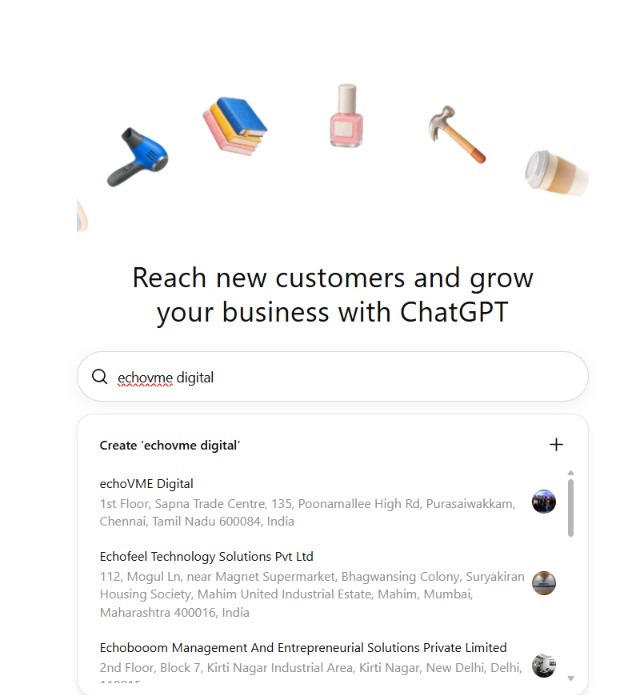
Once you open Business Hub, search for your business using its name.
It is advisable to use a ChatGPT account that your business can continue to access, rather than relying on an employee’s personal account.
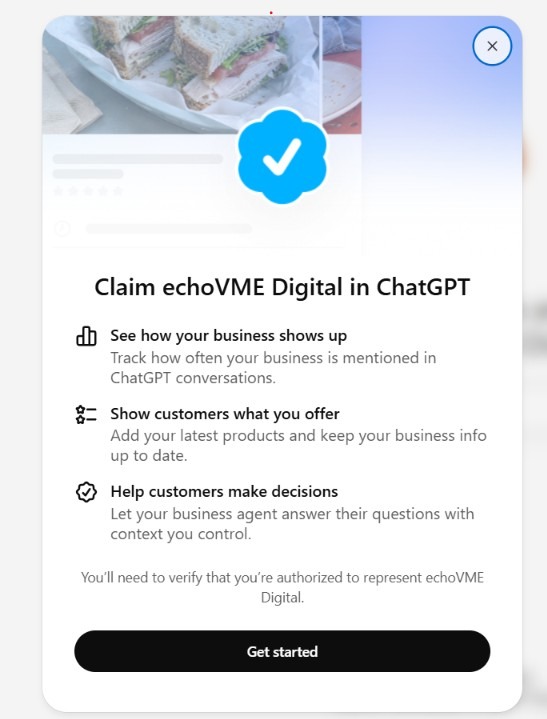
Step 2: Find Your Business Listing
Enter your business name in the search bar.
If your business already has a listing, select the result that accurately matches your organisation.
Before proceeding, check the available business details to ensure you are claiming the correct profile.
You will then be asked to confirm the ChatGPT account you want to use to manage the business.
If you cannot find your business, eligible online businesses may be offered an option to add a new business profile.
Step 3: Choose a Business Verification Method
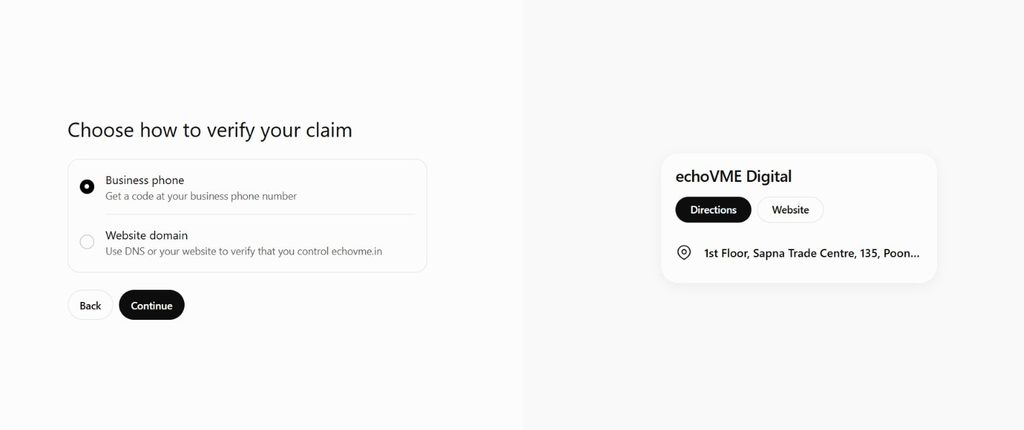
After selecting your business listing, ChatGPT Business Hub will display the verification methods available for your particular business. OpenAI currently documents four possible verification methods:
- Business Phone Verification
- Business Email Verification
- Website Domain Verification
- Shopify Verification
Important: You may not see all four options. The available verification methods depend on your business listing, location, and eligibility. Select only the method displayed in your Business Hub account.
If a particular verification option is unavailable, check whether another supported method is offered for your listing.
Depending on your listing, you may be able to verify your ownership through:
1. Business Phone Verification
- Select the Business Phone option.
- Choose SMS or an automated phone call, depending on availability.
- Request the verification code.
- Enter the code received on the displayed business phone number.
2. Business Email Verification
- Select Business Email.
- Request a verification code.
- Check the business email address associated with the listing.
- Enter the code to verify your connection to the business.
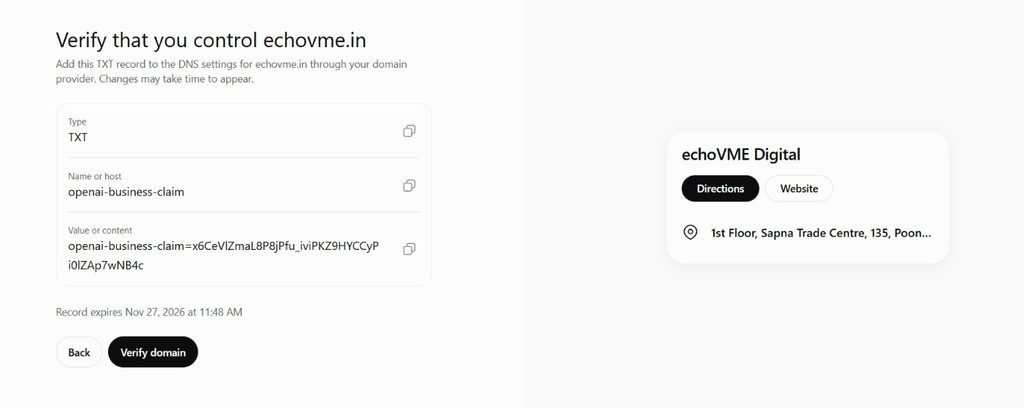
3. Website Domain Verification
- Select Website Domain.
- Business Hub will provide a DNS TXT record.
- Log in to your domain hosting or DNS management platform.
- Add the TXT record using the exact type, host, and value provided.
- Return to Business Hub and select Verify Domain.
If your website is managed by a developer or hosting provider, you may need their assistance to add the DNS record.
4. Shopify Verification
Businesses using Shopify can connect their stores directly to ChatGPT.
- Open Business Hub.
- Select Shopify Store.
- Click Connect Shopify.
- Review the requested permissions.
- Sign in to your Shopify account.
- Follow the instructions to complete the connection and verification.
The available methods vary depending on your business listing. You only need to use a method offered for your business.
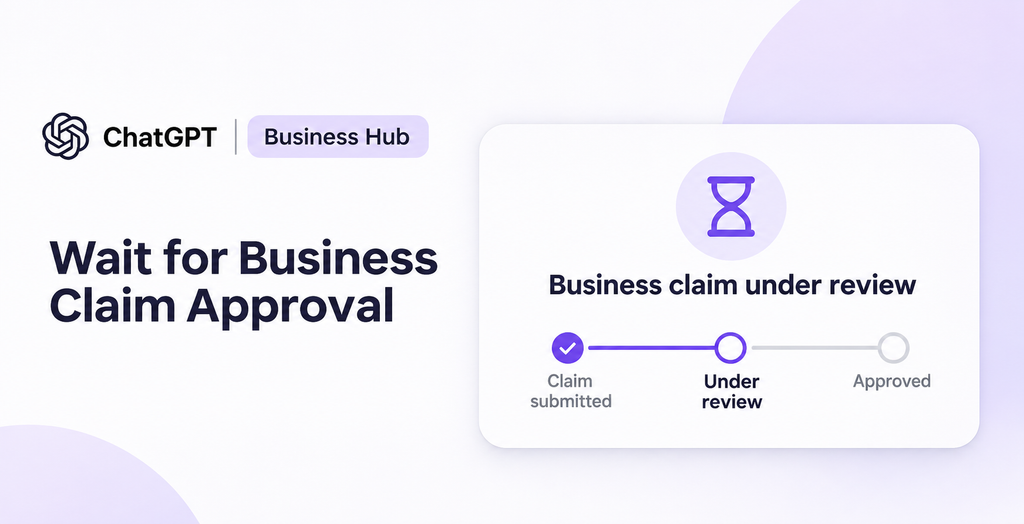
Step 4: Wait for Business Claim Approval
After submitting your verification details, OpenAI will review your claim.
You will receive an email informing you about the decision or requesting additional information if required.
If your claim is still under review, you can access the existing claim through the same ChatGPT account used to submit it.
Remember that submitting a claim does not automatically give you ownership of the business profile. You must wait for OpenAI’s approval.
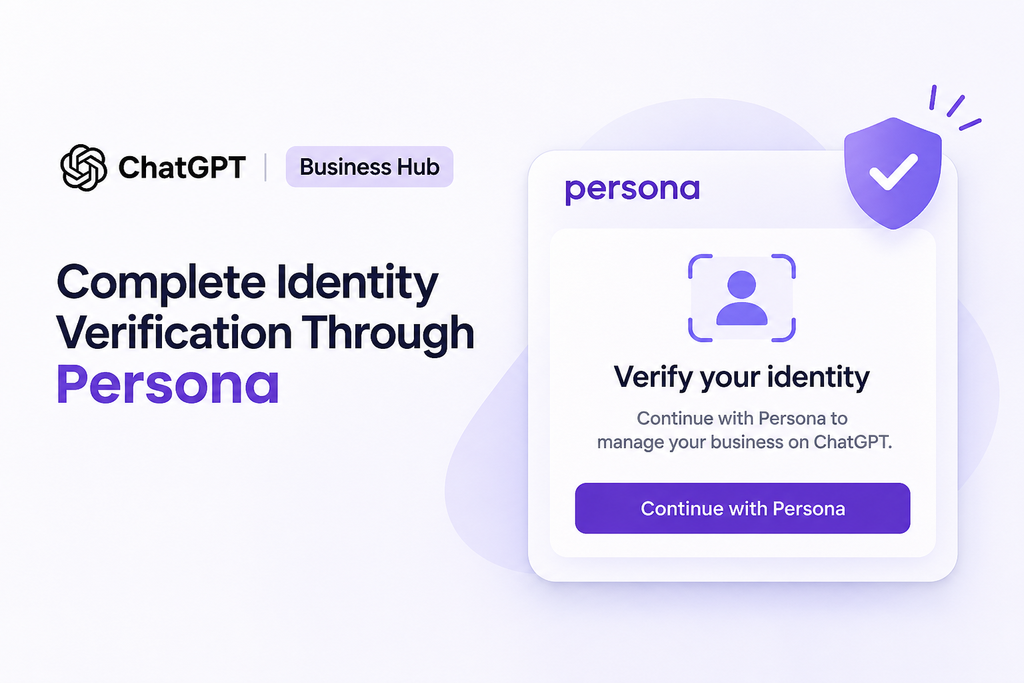
Step 5: Complete Identity Verification Through Persona
Once your business claim is approved, you may need to complete an additional identity verification process through Persona.
This is different from verifying your connection to the business.
While business verification establishes your authority to represent the organisation, Persona verifies the identity of the individual managing the profile.
You may be asked to provide:
- A government-issued identity document.
- Business registration information.
- Documents demonstrating your authority to represent the business.
Follow the instructions provided by Persona and wait for the verification decision.
Completing Persona verification is necessary before you can publish changes to your business information, access insights, or use certain additional Business Hub features.
Once approved, your business profile can display a blue verified check.
Step 6: Update Your Business Profile
After completing the required verification, you can access your business profile and update the available information.
Some of the details you can manage include:
- Business name.
- Website URL.
- Business description.
- Business category.
- Business logo.
- Cover image.
- Product and service information.
- Delivery policies.
- Return policies.
Make sure the information is accurate, consistent, and updated regularly.
For ecommerce businesses, adding structured product information can also help provide more detailed information about products, prices, and availability.
How to Check Your Business Performance on ChatGPT Business Hub
One of the useful features of Business Hub is its Insights section.
Once your claim and Persona verification are approved, you can access aggregated insights about how your business appears in ChatGPT.
The platform provides three important types of insights.
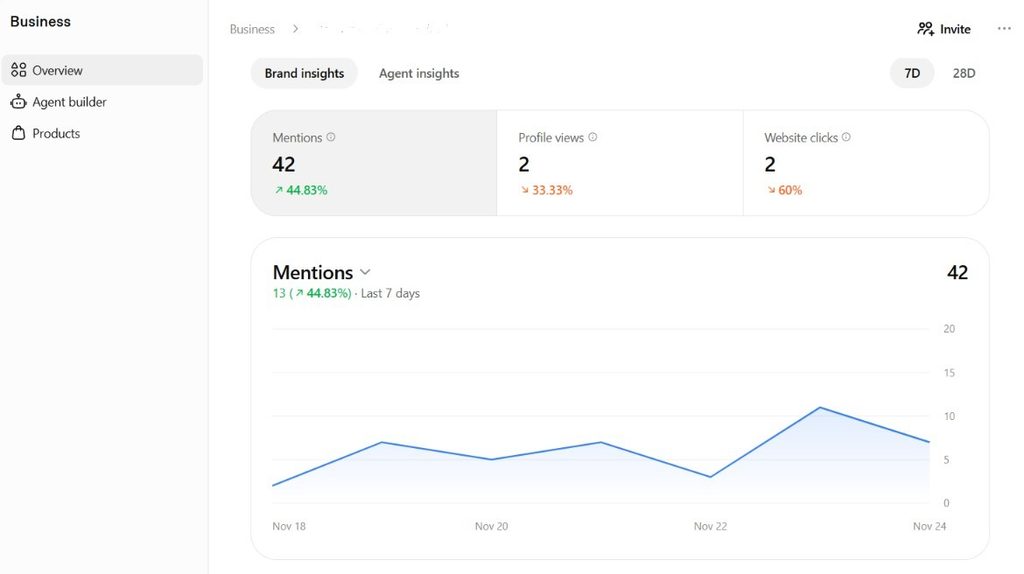
1. Business Mentions
This metric helps you understand how frequently your business is referenced in ChatGPT.
For online businesses, a mention is recorded when ChatGPT references the business website.
For local businesses, a mention is recorded when ChatGPT displays a result for that location.
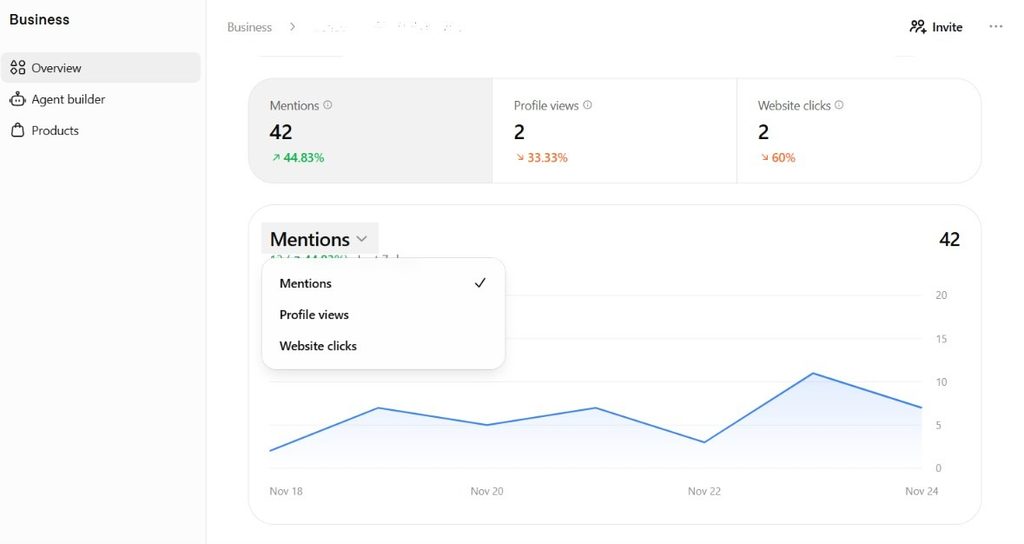
2. Website Clicks
Website clicks show how frequently users click through to your website from ChatGPT.
This can help businesses understand whether their presence in AI-generated answers is generating website visits.
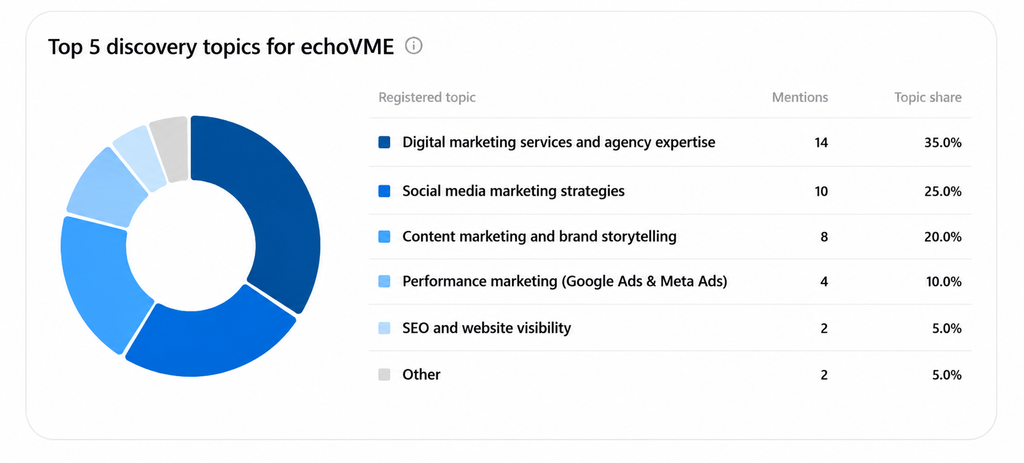
3. Discovery Topics
Discovery topics show common themes in ChatGPT answers where your business is mentioned or cited.
For example, a digital marketing agency may appear in discussions around SEO services, social media marketing, or digital marketing courses.
These insights are aggregated. Businesses do not receive individual customer prompts or private ChatGPT conversations.
Business Hub currently provides insights covering the past 28 days.
Does Claiming Your Business on ChatGPT Improve AI Search Rankings?
This is one of the most important questions for SEO professionals and business owners.
The short answer is: Claiming your business does not guarantee better rankings or recommendations in ChatGPT.
Business Hub gives eligible businesses a way to manage their information and access insights. However, ChatGPT continues to generate independent recommendations based on the information available to it.
Claiming your profile should therefore be considered one part of a broader AI visibility strategy.
Businesses should continue investing in:
- High-quality website content.
- Technical SEO.
- Accurate business information across online platforms, supported by effective Local SEO practices
- Strong brand mentions and digital PR.
- Relevant product and service pages.
- Structured data and schema markup.
- Helpful content that answers customer questions.
- A consistent online presence across authoritative sources.
For businesses looking to improve their visibility in AI-generated answers, traditional SEO and GEO strategies continue to play an important role.
ChatGPT Business Hub vs Google Business Profile
ChatGPT Business Hub and Google Business Profile both allow businesses to manage important business information, but they serve different purposes.
| Feature | ChatGPT Business Hub | Google Business Profile |
| Platform | OpenAI / ChatGPT | Google Search and Maps |
| Primary purpose | Manage business information in ChatGPT | Manage local business presence on Google |
| Business verification | Phone, email, domain, Shopify, depending on eligibility | Google’s available verification methods |
| Performance insights | Mentions, website clicks, discovery topics | Views, searches, calls, website clicks and other interactions |
| Product information | Product feeds for eligible retailers | Product and merchant features, depending on eligibility |
| AI customer assistance | Business Agent for eligible businesses | Google Business Profile messaging and other available features |
Both platforms can support a business’s digital presence, but claiming a profile on one platform does not replace the need to maintain accurate information on the other.
Common Mistakes to Avoid When Claiming Your Business
While setting up your profile, avoid these common mistakes:
1. Using an Unrelated Personal Account
Choose an account that your organisation can continue to access and manage.
2. Entering Incorrect Business Information
Ensure that your business name, registered details, and other information match your official records.
3. Ignoring Domain Verification Requirements
If you select website verification, copy the DNS TXT record exactly as provided.
4. Assuming Business Claim Approval Means Persona Verification Is Complete
These are separate processes. Complete both where required to access the additional features.
5. Expecting Immediate Ranking Improvements
Claiming a business profile does not guarantee higher placement in ChatGPT recommendations.
6. Assuming Every Business Feature Is Available Everywhere
Availability depends on the business location, industry, and feature-specific requirements.
Frequently Asked Questions About ChatGPT Business Hub
1. Is ChatGPT Business Hub free?
OpenAI’s business claiming process does not require an advertising account or ChatGPT Enterprise agreement. Check Business Hub for the applicable requirements and any feature-specific terms.
2. How do I register my business on ChatGPT?
Sign in to ChatGPT, open Business Hub from the sidebar, search for your business, select the correct listing, and complete the verification method offered for your business.
3. Can I add my business if it is not listed on ChatGPT?
Eligible online businesses may see an option to add a new business profile if their business does not appear in the search results. Availability depends on location and business type.
4. Can Indian businesses claim their business on ChatGPT?
Eligible businesses in locations where ChatGPT is available can get started with business claiming. However, local stores and restaurants can currently claim only existing US listings. Indian businesses should check the available options for their specific business.
5. What documents are required to verify a business?
The requirements depend on the verification method. You may need access to your business phone, email, website DNS settings, or Shopify store. Persona identity verification may additionally require government-issued identification and business registration documents.
6. How long does ChatGPT business verification take?
Verification and claim approval times can vary. OpenAI reviews submitted information and may contact you for additional details.
7. Does claiming a business guarantee that ChatGPT will recommend it?
No. Claiming allows businesses to manage their profiles, but ChatGPT continues to make independent recommendations. It does not guarantee better rankings, visibility, or sales.
8. Can I connect my Shopify store to ChatGPT Business Hub?
Yes. Eligible Shopify merchants can connect their stores through Business Hub or the ChatGPT app in their Shopify admin to manage their business information and product details.
9. What is a Business Agent in ChatGPT?
A Business Agent is an AI-powered assistant that can answer customer questions using information provided by an eligible business. It can help customers explore products, services, and business policies.
10. Can I track how many people visit my website from ChatGPT?
Yes. Eligible businesses can access website click insights through Business Hub after completing the required verification. These insights show aggregated activity rather than individual customer conversations.
Conclusion
ChatGPT Business Hub represents another step towards making AI platforms an important part of business discovery.
For business owners, it provides an opportunity to manage their information, share product details, and understand how their brands appear in ChatGPT.
However, claiming a business profile should not be treated as a replacement for SEO or a guaranteed way to rank in AI-generated answers.
Businesses should combine accurate business information, strong website content, technical SEO, and GEO strategies to build a stronger digital presence. Professionals looking to develop these skills can explore the AI and digital marketing course offered by Digital Scholar.
As AI-powered search continues to evolve, staying informed about platforms like ChatGPT Business Hub can help businesses prepare for the next phase of online discovery.