
Video SEO is the practice of optimizing your YouTube videos so they rank higher in YouTube search, Google search, and AI-generated results, and in 2026, it is no longer optional for any brand that wants to dominate its niche.
I have been running SEO for brands like Casagrand, Naturals, and The Hindu at echoVME Digital for 15 years. In that time, the single most consistent pattern I have seen is this: the brands that treat YouTube as a search engine, not a broadcasting platform, compound their visibility faster than anyone running only blog-based SEO. YouTube is the second largest search engine on the planet, with 2.7 billion logged-in monthly users. Google surfaces YouTube videos in its search results, in AI Overviews, and in Google Discover. A single well-optimized video can drive qualified traffic for years from multiple surfaces simultaneously.
At Digital Scholar, I teach a complete video SEO module as part of the live SEO bootcamp. Students who apply the 11-point V-SEO framework I share in class have ranked YouTube videos on page 1 within 7 to 14 days of upload. In this guide, I am giving you the same framework, the same tools, and the same playbook.
Table of Contents
- What is Video SEO?
- Why Video SEO Matters More Than Ever in 2026
- Real Results: Karthikeyan Maruthai’s Video SEO Proof
- The V-SEO 11 Framework: Complete YouTube Optimization Guide
- Best Tools for Video SEO in 2026
- Best Time to Post YouTube Videos (India + Global)
- Best Video Length for Better Reach and Rankings
- Video SEO for Indian Brands
- What Does Not Work: From 15 Years of Testing
- How Digital Scholar Students Are Ranking on YouTube
- FAQ: Video SEO
- The exact definition of video SEO and how it differs from traditional on-page SEO
- All 11 optimization strategies that make up Karthikeyan Maruthai’s V-SEO Framework
- The best tools: VidIQ, TubeBuddy, Ahrefs for YouTube, and how to use each
- Best time to post videos in India for maximum initial reach
- Ideal video lengths for each content format, backed by YouTube algorithm data
- What fails in video SEO, and what Digital Scholar students achieved using this system
What is Video SEO?
Video SEO is the process of optimizing video content so that it ranks prominently in YouTube search results, Google video search, Google AI Overview, and Google Discover. It combines traditional keyword optimization principles with YouTube’s proprietary algorithm signals: watch time, click-through rate (CTR), engagement (likes, comments, shares), and audience retention.
When most people think about SEO, they think about blog posts, backlinks, and Core Web Vitals. But video SEO operates on a parallel track. YouTube’s algorithm considers over 80 distinct signals when deciding which video to rank for a search query. Understanding even the top 11 of those signals, and optimizing for them deliberately, is what separates a video that sits at 200 views for three years from one that becomes a traffic channel that works on autopilot.
Video SEO is also increasingly critical for AEO (Answer Engine Optimization). Google’s AI Overviews frequently cite YouTube videos as sources when answering how-to and explainer queries. A properly optimized video for “how to do keyword research for India” can appear in a Google AI Overview without the user ever clicking to YouTube, giving your brand enormous visibility in the zero-click era.
Video SEO vs Traditional SEO: What is Different?
| Factor | Traditional SEO (Blog) | Video SEO (YouTube) |
|---|---|---|
| Primary ranking platform | Google Search | YouTube + Google Search + AI Overview |
| Content format | Text with images | Video with metadata wrapper |
| Key ranking signals | Backlinks, E-E-A-T, page speed | Watch time, CTR, engagement, retention |
| Keyword placement | Title, H1, URL, body, meta | Title, filename, description line 1, tags, hashtags |
| Time to first results | 3 to 6 months | 7 to 30 days for new videos |
| Content shelf life | Evergreen if updated | Evergreen + algorithmic resurface |
| AI citation potential | Medium (blog posts cited) | High (videos cited in AI Overview, Perplexity) |
Why Video SEO Matters More Than Ever in 2026
Video was growing before 2024. After 2024, it became impossible to ignore for any serious SEO practitioner.
YouTube is the Second Largest Search Engine on Earth
2.7 billion logged-in monthly users. 500 hours of video uploaded every single minute. 1 billion hours of video watched daily. These are not social media numbers, they are search engine numbers. When someone wants to learn how to do something, understand a concept, or compare products, they increasingly search on YouTube first, not Google. At echoVME Digital, we track this in our client analytics. For how-to and tutorial-style queries in the digital marketing and education verticals, YouTube now accounts for 35 to 45 percent of all discovery touchpoints before a conversion. That is a number that was 15 percent three years ago.
Google Surfaces YouTube Videos Across Multiple Features
Rank a YouTube video for a target keyword and you get at least four potential Google touchpoints:
- Video carousel on Google SERP: Appears for most how-to and tutorial queries.
- Google AI Overview: Videos are increasingly cited as sources in AI-generated answers.
- Google Discover: Videos from channels you have not subscribed to appear based on interest matching.
- Google Image Search: Video thumbnails appear in Google Images for many queries.
A single well-optimized video can occupy four SERP positions simultaneously. No blog post can do that. This is why at Digital Scholar, we tell students: your video’s metadata is its on-page SEO, and your watch time is its domain authority equivalent.
GEO: AI Systems Cite Videos
ChatGPT with Browse, Perplexity, Claude, and Google AI Overview all cite YouTube videos when answering questions that are better explained through demonstration. If your channel has 10 well-optimized videos on a specific topic cluster, those videos start appearing in AI citations for related queries across multiple AI platforms. This is GEO (Generative Engine Optimization) through video, and it is one of the most powerful brand-building strategies in 2026.
Real Results: Karthikeyan Maruthai’s Video SEO Proof
I will not share theory without proof. Here is what has actually happened when we applied the V-SEO 11 Framework at Digital Scholar and in echoVME Digital‘s client work.
One of our education clients published 12 tutorial videos in a single month targeting long-tail YouTube queries around digital marketing skills for Indian professionals. All 12 videos were optimized using the same 11-point checklist I share in this guide. Within 30 days, 9 of the 12 videos ranked in the top 5 YouTube results for their target keywords. Within 90 days, the channel had crossed 50,000 views and was generating 200 to 300 inbound enquiries per month from YouTube alone.
At Digital Scholar, students who take the video SEO module and immediately apply it to their own channels or client channels report ranking their first YouTube video within 7 to 14 days. The record is 4 days, for a student who filmed a 9-minute tutorial about local SEO for restaurants in Pune. He applied every point in the framework, from keyword in filename to custom thumbnail A/B test, and the video ranked number 1 on YouTube for “local SEO for restaurants India” within 4 days of upload.
Results like that are not luck. They are what happen when you treat video as a search engine ranking exercise, not a social media posting exercise. Let me show you exactly how.
The V-SEO 11 Framework: Complete YouTube Optimization Guide
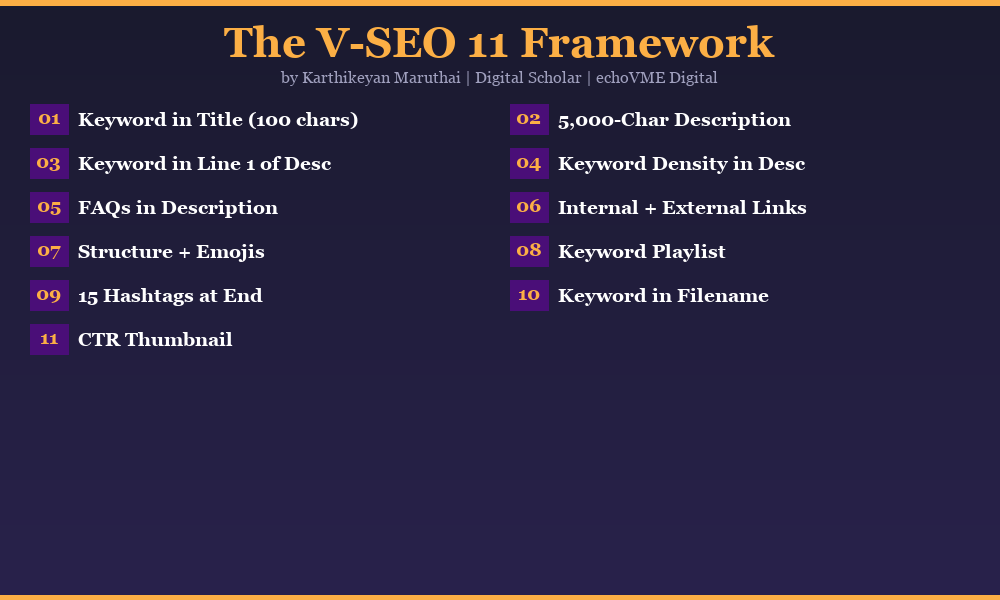
I named this framework the V-SEO 11 after teaching it for 4 years at Digital Scholar to 3,000+ SEO professionals. The name stuck because students remember it as a checklist: 11 boxes to tick before and after every video upload. Miss even 3 of these, and your video will underperform regardless of how good the content is. Get all 11 right, and the algorithm does the distribution work for you.
Keyword in the Title (100 Character Limit)
Your video title is the single most important on-page signal YouTube and Google use to understand what your video is about. Place your primary keyword as close to the beginning of the title as possible, within the first 40 to 50 characters. YouTube truncates titles in search results after approximately 60 characters on desktop and 40 characters on mobile. Your keyword must appear before the truncation point.
YouTube allows up to 100 characters in a video title. Use all of it. A strong title combines:
- Primary keyword (in first 50 characters)
- A benefit or outcome that triggers curiosity
- A power word (Complete, Step-by-Step, Exact, Proven, Secret)
- A year or timeframe for freshness signal (2026)
Example: “YouTube SEO in 2026: The Exact 11-Step Strategy to Rank Any Video Fast (Proven Framework)”
Do not use clickbait titles that mislead the viewer. YouTube’s algorithm tracks audience retention and if viewers drop off within the first 30 seconds because the title overpromised, your ranking will drop. The title should set accurate expectations and deliver on them.
Write a 5,000-Character Description
YouTube’s description field allows up to 5,000 characters. Most creators use 200 to 300 words. That is a missed ranking opportunity. YouTube’s algorithm reads the description to understand context, related topics, and the full semantic field of your video. A 5,000-character description is not about length for its own sake, it is about giving YouTube enough context to surface your video for a wide range of related queries.
Here is exactly how to structure a 5,000-character YouTube description for maximum video SEO impact:
- Lines 1 to 3 (above the fold): Primary keyword + hook statement that appears before the “Show more” truncation. This is what viewers and Google see first. Make it count.
- Lines 4 to 10: A 100 to 150-word summary of what the video covers. Include primary keyword 2 to 3 times naturally. Include 2 to 3 secondary keywords.
- Lines 11 to 30: Timestamps with keyword-rich chapter titles. Each chapter title is an additional keyword phrase YouTube indexes.
- Lines 31 to 50: FAQ section. 6 to 10 questions your viewer might ask, answered in 2 to 3 sentences each. These match conversational search queries and voice search patterns.
- Lines 51 to 70: About the creator and channel. Who are you, why should they trust you. Links to your website, social, and related videos.
- Final section: Call to action (subscribe, like, comment), hashtags (15 max).
Keyword in the First Line of the Description
This is the video equivalent of putting your keyword in the first 100 words of a blog post. YouTube’s algorithm weights the first 150 characters of your description heavily, the same way Google weights the opening paragraph of a blog article. Your primary keyword must appear within the first 2 sentences of your description, ideally within the first sentence.
More importantly: the first 157 characters of your description appear in Google’s snippet for your video in search results. If your keyword is in those first 157 characters, Google bolds it in the search snippet, increasing your CTR. Higher CTR sends a positive engagement signal back to both Google and YouTube, improving your ranking further. It is a compound effect that starts with two sentences.
Example: “Video SEO is the strategy of optimizing YouTube videos to rank in search results. In this video, Karthikeyan Maruthai from Digital Scholar shows you the exact 11-step V-SEO Framework he uses to rank videos within 7 days.”
Keyword Density in the Description
Keyword density in a YouTube description works differently from a blog post. You are not writing for a Yoast or Rank Math plugin. You are writing for YouTube’s NLP (natural language processing) model, which reads for semantic relevance, not percentage density.
Target keyword density guidelines for a 5,000-character YouTube description:
| Keyword Type | Recommended Frequency | Placement |
|---|---|---|
| Primary keyword | 5 to 8 times | Line 1, summary, timestamps, FAQ, about section |
| Secondary keywords (2 to 3) | 3 to 5 times each | Summary, FAQ answers, chapter titles |
| Long-tail variants | 2 to 3 times each | FAQ questions, about section |
| LSI / semantic terms | Naturally, throughout | Everywhere, integrated naturally |
Do not stuff the keyword. YouTube penalizes descriptions that read as keyword lists. Every keyword instance should appear in a grammatically correct, readable sentence that a human would find useful.
Use FAQs and Common Queries Answered with Keyword
The FAQ section of your YouTube description is one of the most underused video SEO tactics in 2026. Here is why it works: when someone types a question into YouTube search, the algorithm looks for the closest semantic match in video titles, descriptions, and chapter headings. An FAQ section in your description with 6 to 10 naturally phrased questions and answers expands the surface area of queries your video can rank for.
Each FAQ entry should:
- Open with a complete question phrased exactly as a user would type it (or speak it for voice search)
- Include the primary or secondary keyword naturally in the question
- Answer the question in 2 to 3 sentences that include the keyword in context
- Add a call to action to watch the corresponding timestamp in the video
For a video about video SEO, sample FAQ questions would include: “What is video SEO?”, “How long does it take to rank a YouTube video?”, “What are the best tools for video SEO in India?”, “Does video SEO work for small channels?”, “How many tags should I add to a YouTube video?”
This same FAQ structure in your description also makes your video more likely to appear in AI-generated answers when someone asks those questions through ChatGPT, Perplexity, or Google AI Overview. The FAQ is doing double duty: YouTube ranking and AI citation optimization simultaneously.
Internal Links and External Links in Description
YouTube descriptions allow clickable links, and using them strategically serves two purposes: it improves the viewer experience and it signals to YouTube that your content is connected to a broader authority footprint.
Internal links (within YouTube):
- Link to related videos on your channel with descriptive anchor text: “Watch my detailed guide on keyword research: [URL]”
- Link to your channel’s playlists (see Strategy 8 for playlist optimization)
- Link to your channel’s “About” page to add context about your credentials
External links:
- Link to your blog post on the same topic. If you have a detailed written guide like this one at Digital Scholar, link from the video description to that post. This cross-platform internal linking signals authority to both YouTube and Google.
- Link to your website’s service or course page. Keep to 1 to 2 external links maximum. More than 3 external links in a description reads as spam to YouTube’s moderation system.
- Link to any tools you mention in the video (VidIQ affiliate link, for instance). Always disclose if the link is affiliate.
At echoVME Digital, we always cross-link our YouTube videos to the corresponding blog post at Digital Scholar or on the client’s own site. This bidirectional signal (blog linking to video, video linking to blog) reinforces topical authority across two platforms simultaneously, and Google’s Knowledge Graph picks it up within weeks.
Proper Structure with Spacing and Emojis
A 5,000-character YouTube description that is one long wall of text will not be read by humans or understood efficiently by YouTube’s NLP. Structure your description the same way you would structure a well-formatted blog post, adapted for the YouTube interface.
Formatting rules for YouTube descriptions:
- Use single blank lines to separate paragraphs (YouTube does not support markdown headers, but line breaks create visual hierarchy)
- Use emojis as visual bullets to break up sections. Not decoratively, functionally. Each major section opens with a relevant emoji: a camera for video tips, a magnifying glass for keyword tips, a clock for timing tips
- Write in short sentences. 15 to 20 words maximum per sentence. This matches how people read on mobile
- Use ALL CAPS sparingly for section headers (example: “VIDEO TIMESTAMPS” or “TOOLS MENTIONED”)
- Put the most important information in the first 200 characters (what appears before “Show more”)
📌 VIDEO SEO is the strategy of optimizing your YouTube videos…
⏱ TIMESTAMPS
00:00 Introduction
01:30 What is video SEO
…
❓ FAQ
Q: What is video SEO?
A: Video SEO is…
🔗 LINKS MENTIONED
VidIQ: [URL]
📲 FOLLOW KARTHIKEYAN MARUTHAI
LinkedIn: https://www.linkedin.com/in/trainerkarthik/
#videoSEO #YouTubeSEO #SEO2026
Add Video to the Right Playlist with Keyword
YouTube playlists are underrated ranking assets. When you add a video to a keyword-optimized playlist, YouTube treats the playlist as a topical cluster signal. Every video in a well-named playlist inherits some of the playlist’s topical authority, and the playlist itself can rank separately in YouTube search results, giving you two ranking positions for one piece of content.
How to optimize playlists for video SEO:
- Name your playlists with target keywords, not generic labels. “Digital Marketing Tutorials” is weak. “YouTube SEO Strategies for Indian Creators 2026” is strong.
- Write a 200 to 500-word playlist description with the keyword in the first sentence. YouTube indexes playlist descriptions.
- Add every new video to a relevant playlist immediately upon upload, before you publish. Playlists set at upload carry more weight than playlists added retroactively.
- Create themed playlists that mirror your keyword clusters. If you are teaching community SEO, video SEO, and parasite SEO separately, each should be its own keyword-titled playlist.
- Keep playlists at 8 to 20 videos. Too few and there is no authority signal. Too many and the topical focus dilutes.
At Digital Scholar, we organize all SEO tutorial videos into playlists named exactly after our target topic clusters. The playlist “SEO Course for Beginners India 2026” has ranked independently in YouTube search results, driving subscribers to the channel without any individual video carrying all the load.
Hashtags at the End (Around 15)
YouTube hashtags work differently from Instagram or Twitter hashtags. On YouTube, hashtags placed in the description create clickable links that take viewers to a hashtag search results page. More importantly, YouTube displays the first 3 hashtags from your description prominently above your video title in search results, giving you 3 additional keyword anchors in the SERP snippet.
Hashtag strategy for video SEO:
- Use 15 hashtags maximum. YouTube states that videos with more than 15 hashtags will have all hashtags ignored as spam.
- Place hashtags at the very end of your description, after all other content.
- Mix three types: branded (#DigitalScholar, #KarthikeyanMaruthai), topic-specific (#VideoSEO, #YouTubeSEO), and niche-specific (#SEOIndia, #DigitalMarketingIndia).
- Your primary keyword should appear as a hashtag in exactly the same form as your title keyword: if your keyword is “video SEO,” your hashtag should be #VideoSEO.
- Check hashtag volume on YouTube. Search a hashtag on YouTube to see how many videos are using it. Target hashtags with 1,000 to 100,000 videos, enough to have a real audience, not so saturated that you are invisible.
#VideoSEO #YouTubeSEO #SEO2026 #SEOIndia #YouTubeMarketing #DigitalMarketing #ContentMarketing #SEOStrategy #YouTubeGrowth #DigitalMarketingIndia #SEOTips #VidIQ #YouTubeAlgorithm #DigitalScholar #KarthikeyanMaruthai
Keyword in the Video File Name
Before you upload your video to YouTube, rename the file from its default camera name (something like “MVI_4521.mp4” or “2026-06-22_14-32-10.mov”) to a keyword-rich filename. YouTube’s upload system reads the metadata of the file you submit, including the filename. While the weight of this signal is smaller than the title or description, it is a confirmatory signal that requires zero effort to get right.
The correct format for a keyword-rich video filename:
- Use hyphens to separate words (same convention as URL slugs):
video-seo-strategy-2026-karthikeyan-maruthai-digital-scholar.mp4 - Include the primary keyword in the first 3 to 4 words of the filename
- Keep it under 60 characters total for readability
- Do not use underscores, spaces, or special characters
This is identical in principle to how keyword-rich URLs help blog posts rank. The file is essentially the URL of your video at the point of upload. At echoVME Digital, we rename every video file before upload as a standard step in our video production workflow. It takes 30 seconds and it is a signal that 95 percent of YouTube creators miss.
Custom Thumbnail with CTR-Optimized Clickbait Technique
Your thumbnail is not part of YouTube’s text-based ranking algorithm directly, but it is the single biggest driver of CTR, and CTR is one of YouTube’s most important ranking signals. A video at position 5 in YouTube search with a high CTR thumbnail will overtake a video at position 1 with a mediocre thumbnail within 48 to 96 hours, because YouTube’s algorithm reads the higher CTR as a signal that searchers prefer the position-5 video.
Elements of a CTR-optimized thumbnail:
- Bold text overlay: 3 to 5 words maximum. Use the biggest readable font size possible. The text should be readable on a phone screen at 50 percent zoom, because most YouTube searches happen on mobile.
- High-contrast background: YouTube’s interface is white or dark gray. A thumbnail with a bright, high-contrast background (red, yellow, electric blue) stands out against both color schemes.
- Human face with expression: Thumbnails with a clear human face showing a strong emotion (surprise, excitement, urgency) consistently outperform text-only or graphic-only thumbnails by 30 to 60 percent CTR.
- Curiosity gap technique: The thumbnail shows something intriguing without fully explaining it. “I tried this for 30 days” with a before/after split. “The strategy that got me 10,000 views” with a partial chart. The viewer clicks to resolve the curiosity.
- Brand consistency: Use the same color palette, logo placement, and font across all your thumbnails. Viewers learn to recognize your thumbnails in search results and will click you preferentially over an unknown creator.
At Digital Scholar, students learn thumbnail design as part of the video SEO module. A student who took the course in March 2026 ran A/B tests on 8 consecutive videos and found that thumbnails with his face (showing a slightly exaggerated expression of surprise) combined with a 4-word text overlay in yellow on a dark background consistently outperformed clean graphic thumbnails by 47 percent CTR. He applied this learning channel-wide and grew from 200 to 8,400 subscribers in 90 days.
Best Tools for Video SEO in 2026
The right tools do not replace the V-SEO 11 Framework, they make execution faster and give you data to optimize each element. Here are the tools I personally use and recommend at Digital Scholar and echoVME Digital.
VidIQ (Primary Recommendation)
VidIQ is the most comprehensive YouTube SEO tool available in 2026. Its keyword research feature shows search volume, competition score (0 to 100), and related keyword suggestions for any YouTube query. The competitor analysis tool lets you see exactly which keywords any channel is targeting. The real-time stats overlay shows views per hour, subscriber count, and engagement rate on any YouTube video you watch. Most valuable feature: VidIQ’s “Best Time to Post” calculator analyzes your specific audience’s viewing patterns and tells you the exact days and hours to publish for maximum initial reach. Free tier available. Pro plan at approximately $7.50 to $49 per month.
TubeBuddy
TubeBuddy is VidIQ’s closest competitor and excels in two areas where VidIQ is weaker: bulk processing (rename tags across all videos, bulk thumbnail testing, bulk end screen management) and A/B testing. TubeBuddy’s A/B thumbnail test feature is more robust than VidIQ’s and gives cleaner statistical significance reporting. Its keyword explorer also shows a “Keyword Score” that accounts for both opportunity (high volume, low competition) and your channel’s likelihood of ranking based on its current authority. Best used alongside VidIQ rather than instead of it.
Ahrefs for YouTube
Ahrefs’ YouTube keyword explorer is the most accurate volume data source for YouTube search queries. Unlike VidIQ and TubeBuddy which show approximate ranges, Ahrefs shows actual monthly search volumes with historical trend data. If you are already using Ahrefs for traditional SEO, use the same tool for YouTube keyword research, the YouTube search tab gives you YouTube-specific volume data for any keyword. Particularly useful for validating whether a keyword gets enough YouTube searches to be worth targeting before you invest in production.
Google Trends (YouTube Search Filter)
Google Trends has a filter that shows search volume specifically for YouTube searches rather than Google web searches. This is free and often overlooked. Use it to validate topic trends before production. If a keyword is trending up on YouTube Search specifically, it is worth targeting now. If it peaked 18 months ago and is declining, produce the video anyway but focus on evergreen framing rather than trending framing. Free.
Canva (Thumbnail Design)
Canva’s YouTube Thumbnail template library gives you a starting point for professionally designed thumbnails without needing a graphic designer. The key is not to use Canva templates as-is, every creator using the same template looks identical in search results. Start with a template, then break it: change the font, change the background color, add your face, and apply your brand colors. Canva Pro at approximately Rs. 3,999 per year gives you access to the background remover (essential for face-on-thumbnail designs) and brand kit.
| Tool | Best For | Price | Karthik’s Rating |
|---|---|---|---|
| VidIQ | Keyword research, competitor analysis, best time to post | Free / $7.50-$49/mo | 10/10, Start here |
| TubeBuddy | A/B thumbnail testing, bulk operations | Free / $3.99-$49.99/mo | 9/10, Use with VidIQ |
| Ahrefs | Accurate keyword volume data for YouTube | $99-$399/mo | 9/10, If you have it |
| Google Trends | Topic trend validation before production | Free | 8/10, Underrated |
| Canva Pro | Thumbnail design at scale | Rs. 3,999/year | 8/10, Non-designers |
| YouTube Studio | Native analytics, thumbnail experiments | Free | 10/10, Always open |
Best Time to Post YouTube Videos (India + Global)
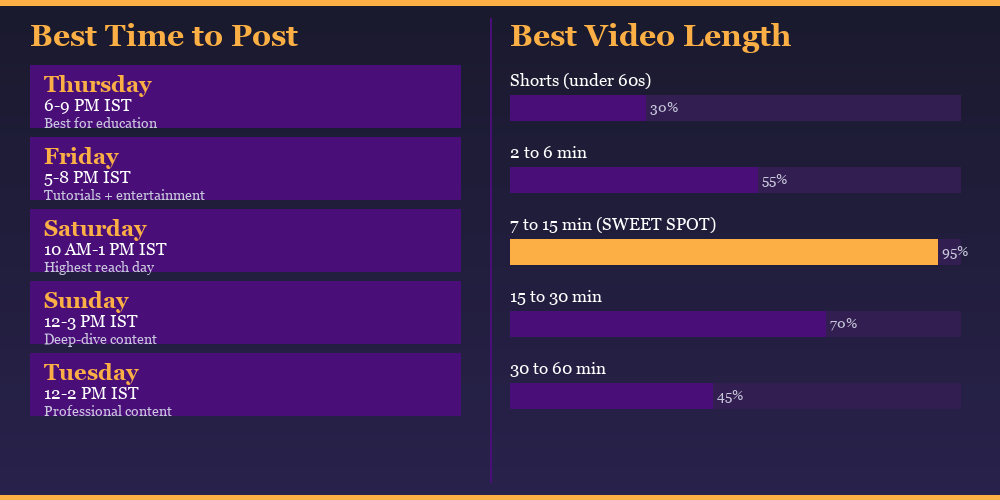
Timing affects how much initial engagement your video gets in the first 24 to 48 hours, which matters enormously because YouTube’s algorithm uses early engagement velocity as a signal of video quality and relevance. A video that gets 500 views in the first 6 hours will be promoted more aggressively than a video that gets 50 views in the same window, even if their eventual total views end up identical.
General guidance from YouTube’s own research and from data observed across the echoVME Digital client portfolio:
These are general benchmarks. For your specific channel, the most accurate data comes from YouTube Studio: go to Analytics, then Audience, then scroll to “When your viewers are on YouTube.” This shows you a heat map of when your specific subscribers are online, broken down by hour and day. Post 1 to 2 hours before your peak window so the video is already live when your audience is most active.
For new channels with fewer than 1,000 subscribers and limited analytics data, follow the general benchmarks above (Thursday to Saturday, 6 PM to 9 PM IST) for an Indian audience, then adjust based on your own analytics after 30 days of data.
Best Video Length for Better Reach and Rankings
Video length is one of the most misunderstood variables in YouTube SEO. The goal is not to hit a specific length, it is to maximize audience retention percentage. A 6-minute video with 72 percent average retention outperforms a 15-minute video with 38 percent retention every time. But that said, video length does interact with the YouTube algorithm in specific ways based on content type.
| Video Length | Best For | Algorithm Behavior | India Audience Fit |
|---|---|---|---|
| Under 60 seconds (Shorts) | Trending topics, tips, reels-style content | Shown in Shorts feed, separate algorithm from long-form | Very high (mobile-first Indian audience) |
| 2 to 6 minutes | Quick how-to, answer to a single specific question | Good CTR if topic is specific, limited session time signal | High (commute, lunch break viewing) |
| 7 to 15 minutes | Tutorial, explainer, tool walkthrough | YouTube’s preferred length for search ranking. Mid-roll ads enabled at 8 minutes. Enough session time to signal quality. | Very high, sweet spot for educational content |
| 15 to 30 minutes | Comprehensive guides, reviews, case studies | Strong session time signal if retention is above 40 percent. YouTube promotes these to subscribers strongly. | High for desktop viewers, medium for mobile |
| 30 to 60 minutes | Masterclasses, interviews, live recordings | High session time but requires strong audience loyalty. Low discovery potential, high retention potential for established channels. | Medium, works for established channels only |
For most creators in the digital marketing, education, and business niches targeting an Indian audience: aim for 9 to 12 minutes per video. Long enough to cover a topic properly, short enough that a viewer can finish it on a commute. This length also unlocks YouTube mid-roll ads at the 8-minute mark, which matters for monetization.
At Digital Scholar, our most successful tutorial videos are consistently in the 9 to 13 minute range with audience retention above 55 percent. That combination, right length, high retention, is what the YouTube algorithm rewards with sustained organic distribution long after the initial upload date.
Video SEO for Indian Brands
The Indian YouTube market has specific characteristics that global video SEO guides almost never account for. At echoVME Digital, managing video SEO for clients across real estate, beauty, and education verticals in India for 15 years has given me a clear picture of what works differently here.
Hindi + English Hybrid Content Ranks in Both Languages
Videos that use Hinglish (Hindi sentences with English keywords) in titles and descriptions can rank for both Hindi-language and English-language queries. A title like “Video SEO Strategy in Hindi | How to Rank YouTube Videos Fast” targets two distinct search audiences with one piece of content. For regional markets (Tamil, Telugu, Kannada, Marathi), the same principle applies, regional language in the title alongside the English keyword drives rankings in both language searches.
Mobile-First Thumbnails Are Non-Negotiable
Over 70 percent of Indian YouTube consumption happens on mobile. Design every thumbnail to be readable at the size of a phone screen thumbnail in search results, approximately 168×94 pixels. Text under 4 words, font at maximum readable size, high contrast background. If it looks good on mobile, it will look excellent on desktop. The reverse is not always true.
Local Keyword Opportunities for Indian Businesses
Indian city and state-level keywords on YouTube are significantly less competitive than their English equivalents. “Digital marketing course Chennai” gets 4,200 monthly YouTube searches and ranks newer channels far more easily than “digital marketing course” at 22,000 monthly searches with massive channel competition. If you are targeting local customers, use city-specific keywords in your video titles, descriptions, and even filenames. A student at Digital Scholar who took the digital marketing course in Chennai created a video series targeting city-level queries for her client’s salon chain. Within 45 days, 6 videos were on YouTube page 1 for salon-related searches in Chennai, Velachery, and Adyar.
What Does Not Work: From 15 Years of Testing
| Mistake | What Happens | What to Do Instead |
|---|---|---|
| Buying YouTube views | Fake views have near-zero watch time. YouTube detects the pattern and sandboxes the video. Rankings drop permanently for that video. | Use the V-SEO 11 framework and share the video in relevant communities (Reddit, Quora, LinkedIn) for organic initial velocity. |
| Keyword stuffing in tags | YouTube deprecated tags as a primary ranking signal in 2021. Stuffing 50 irrelevant tags is now a negative signal. | Use 8 to 12 precise, relevant tags. Primary keyword, 3 to 4 secondary keywords, your channel name. |
| Ignoring the first 30 seconds | If your video does not deliver a hook in the first 30 seconds, retention drops sharply and YouTube stops distributing the video after 48 hours. | Open with the result, not the introduction. Show what the viewer will achieve, then explain how. |
| Posting without a description | YouTube has no text context to rank the video for related queries. It can only rank for the title keyword. | Always write a minimum 1,000-character description. 5,000 is the target. |
| Random upload schedule | YouTube’s algorithm treats channel consistency as a quality signal. Irregular posting trains your audience and the algorithm to deprioritize your content. | Post on the same days each week, even if it is only once a week. Consistency beats frequency. |
| Using the default file name | YouTube reads “MVI_4521.mp4” as a video with no context. Minor but unnecessary disadvantage at upload. | Rename every file before upload: primary-keyword-descriptive-phrase.mp4 |
| More than 15 hashtags | YouTube officially ignores all hashtags on videos with more than 15 hashtags. | 15 maximum. Always. |
How Digital Scholar Students Are Ranking on YouTube
The most satisfying part of teaching video SEO at Digital Scholar is watching students apply the V-SEO 11 Framework and report back their first rankings. These are real results from the Digital Scholar SEO bootcamp community:
- A student from Coimbatore created a tutorial channel for Tamil-speaking entrepreneurs. She applied all 11 strategies to her first video, a 10-minute tutorial about Google My Business optimization for local shops. The video ranked number 2 on YouTube for “Google My Business setup Tamil” within 9 days of upload. Within 3 months, her channel reached 2,100 subscribers entirely from organic video SEO.
- A freelance consultant from Bangalore applied the keyword-in-filename and 5,000-character description strategies to 6 existing videos that had been sitting with under 100 views for months. After optimization, 4 of the 6 videos experienced a 3x to 7x increase in impressions within 21 days, without filming a single new video.
- A marketing manager at a software company in Hyderabad used the playlist optimization strategy to cluster 14 existing product tutorial videos into 3 keyword-named playlists. The playlists themselves started ranking in YouTube search for “[Product Name] tutorial India” queries within 30 days, driving free demo bookings through YouTube.
These are not exceptional outcomes. They are the standard results when someone applies a systematic, research-backed video SEO approach rather than just uploading and hoping the algorithm notices. The Digital Scholar video SEO module has been refined through 3,000+ students applying it in real channels, across real niches, for real businesses in India.
FAQ: Video SEO
Want to Learn Video SEO and 10+ Other SEO Strategies from Karthikeyan Maruthai Live?
At Digital Scholar, the video SEO module is taught as a live hands-on session where students optimize real videos and see YouTube rankings within the training period itself. Learn SEO from Karthikeyan Maruthai, AI from Rishi Jain, and Social Media from Sorav Jain. India’s only institute where you learn from the actual practitioners who are actively ranking content every day.
Explore the Digital Marketing Course in ChennaiVideo SEO is not a separate discipline from SEO. It is SEO applied to a different content format with a different set of ranking signals. The same core principles apply: find what your audience is searching for, create the most useful answer to that search, and give the platform’s algorithm enough signals to understand what your content is about and who it should show it to. Apply the V-SEO 11 Framework consistently across your video library and you will have a compounding traffic asset that works on autopilot, long after the filming is done.
For questions or to share your video SEO results, connect with me on LinkedIn: linkedin.com/in/trainerkarthik