
Here is a number that should bother you. At Digital Scholar, out of every 1,000 leads we generate on Meta, roughly 600 never pick up the phone. They filled the form, they were interested for eight seconds, and then they vanished. If your only plan is a cold call, you have already lost more than half your money.
Retargeting is how you get those people back. It is the single most underused lever in Meta Ads in India, and it is the reason most small businesses think Meta “does not work” while echoVME runs the same platform at a 10x to 15x return for D2C clients. The difference is not the creative. The difference is that we track, we tag, and we follow up at the ad level.
This is the guide I wish existed when I started. It covers the Meta Pixel, the five events, custom audiences, the customer-list system, the Conversions API signal loop, and the exact campaign structure we use to retarget. No theory you cannot act on. Let me be blunt: read this once, set it up once, and it prints money quietly for years.
In this guide you will learn what Meta Ads retargeting is, how the Meta Pixel works as your tracking backbone, the five pixel events every marketer must know, how to build website and customer-list custom audiences, how the Conversions API feeds lead quality back to Meta, and the exact retargeting campaign structure we use at echoVME and Digital Scholar to turn cold traffic into paying customers.
TL;DR: Meta Ads Retargeting in 60 Seconds
Meta Ads retargeting means showing ads to people who already interacted with your brand (visited your site, watched your video, opened your lead form, or bought before) instead of paying to reach strangers. It works because warm audiences convert far cheaper. In our echoVME accounts, an engaged retargeting audience often converts around Rs 500 per lead while cold prospecting runs much higher.
- The Meta Pixel is a piece of JavaScript on your website that records who visited and what they did. One pixel per website. Verify it with the Meta Pixel Helper Chrome extension.
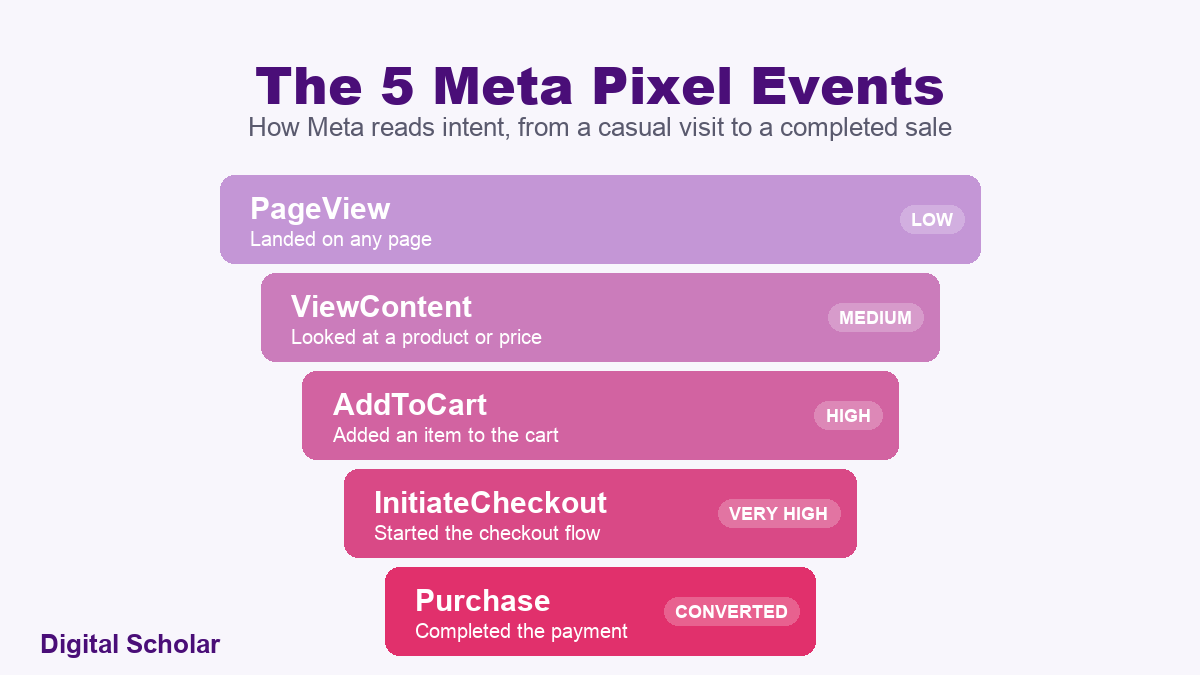
- Five events matter: PageView, ViewContent, AddToCart, InitiateCheckout, Purchase. This ladder tells Meta how close someone is to buying.
- Custom audiences come from two places: your own data (website visitors, customer lists, app activity) and Meta’s data (video viewers, Instagram engagers, lead-form openers).
- The signal loop: you feed lead quality back to Meta through the Conversions API so it finds more good buyers and stops chasing junk.
- The campaign: a Leads or Sales objective where you Include your warm audiences to retarget, or Exclude your existing customers to stop wasting spend.
Who this is for: business owners, D2C founders, and performance marketers in India who already run Meta ads but have never set up proper tracking. If you have a website and a Facebook page, you can do everything in this guide today.
- TL;DR: Retargeting in 60 seconds
- Why listen to me on this
- What Meta Ads retargeting actually is
- Cold, warm, hot: the audience temperature ladder
- The Meta Pixel explained (your CCTV camera)
- The five pixel events that matter
- How to install the Meta Pixel in 10 minutes
- Website custom audiences and the money-page rule
- The 4-List Retargeting Stack
- Meta’s own retargeting sources (video, IG, lead forms)
- The Meta Signal Loop (Conversions API)
- Building the retargeting campaign
- Reading performance without fooling yourself
- What I have tested and rejected
- FAQ
Why Listen to Me on This
I run echoVME Digital, an agency that has managed over 500 brands and roughly Rs 400 crore in cumulative ad spend. I also co-founded Digital Scholar, where we train more than 1,000 students a year in AI and digital marketing. Retargeting is not a slide in my deck. It is the machine that keeps my own course sales and my clients’ D2C revenue running.
My main Digital Scholar ad account runs close to Rs 50 lakh a month on a credit line. I have hit the 250 active-creative cap on that account, which is a problem most marketers never get near. I say this not to flex, but so you know the numbers in this post come from a live account under real pressure, not a certification PDF.
Here is my imperfect truth for this post: for years I ran ads at Digital Scholar without a properly tagged retargeting system, and I left a lot of money on the table. Once we built the customer-list stack and the signal loop you are about to read, our lead quality and our cost per acquisition both improved. Most of what I teach here, I learned the expensive way. If you want the wider context first, start with my breakdown of what performance marketing actually is and then come back.
What Meta Ads Retargeting Actually Is
Meta Ads retargeting is the practice of showing ads only to people who have already touched your brand in some way, instead of paying to reach total strangers. Someone visited your website, watched 15 seconds of your reel, or opened your lead form and left. Retargeting brings them back with a second, sharper message.
Think about how Myntra follows you. You add four kurtis to your cart, you close the app, and for the next week those exact four products chase you across Instagram, Facebook, and half the websites you open. That is retargeting. It is not magic and it is not Meta listening to your microphone. It is a tracking pixel plus a custom audience, which is exactly what you are going to build.
The reason it matters so much in India is cost. A cold audience does not know you, does not trust you, and does not want to give you a phone number. A warm audience already saw your face. At echoVME we treat cold prospecting and warm retargeting as two completely different jobs with two completely different budgets, and we never judge them by the same cost per lead.
The key insight: retargeting does not create demand, it recovers it. Every rupee you spent on awareness and lead generation is wasted unless you have a system to follow up with the people who almost converted.
Cold, Warm, Hot: The Audience Temperature Ladder
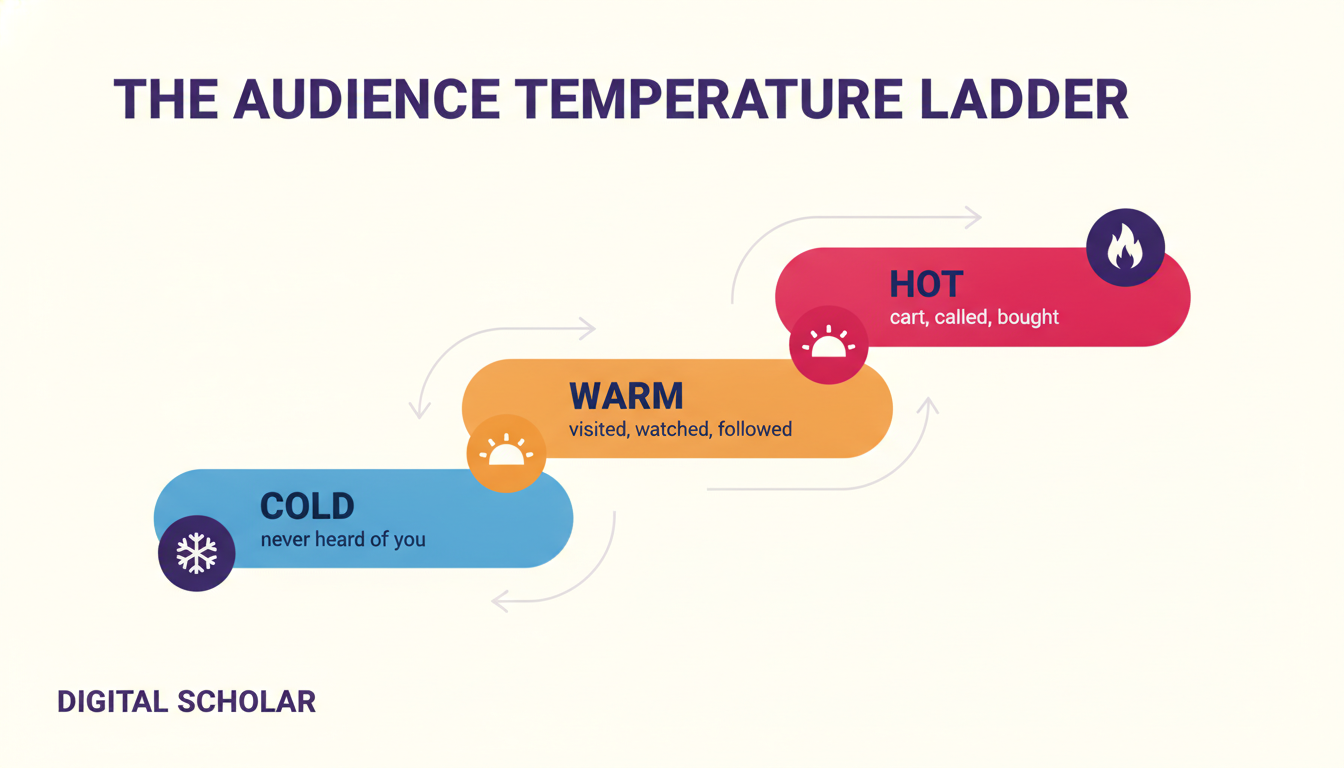
Every person you can reach on Meta sits at one of three temperatures, and each temperature needs a different ad. Get this wrong and you will show a “buy now” offer to someone who has never heard your name, which is like proposing marriage on a first date.
| Temperature | Who they are | What ad they need | Objective |
|---|---|---|---|
| Cold | Never heard of you | Awareness or a strong hook | Awareness / Prospecting |
| Warm | Visited site, watched video, followed, inquired | Proof, testimonials, an offer | Retargeting (Leads / Traffic) |
| Hot | Added to cart, called you, past buyer | Urgency, discount, cross-sell | Retargeting (Sales) |
Cold is where you spend to buy attention. If you are still learning how the top of the funnel is built, my guide to the performance marketing funnel maps every stage. Warm and hot are where retargeting lives, and they are almost always your cheapest, highest-return spend. At Digital Scholar, when we run a testimonial ad to people who already engaged with our account, that engaged segment often comes in around Rs 500 per lead, which is far below what a fresh cold audience costs us.
The Meta Pixel Explained (Your CCTV Camera)
The Meta Pixel is a small piece of JavaScript code that Meta gives you to paste on your website. When someone lands on your site, the pixel fires, maps that person’s device to your dataset, and quietly records what they do. The simplest way I explain it to students at Digital Scholar: the pixel is a CCTV camera sitting behind your website.
Here is a fun test. Install the free Meta Pixel Helper Chrome extension and open any big website. Open Myntra and you will usually see two pixels firing (one from their branding agency, one from their performance agency). Open digitalscholar.in and you will see three. You can see that the camera exists on any site, but you cannot see the footage. Only the account that owns the pixel can build audiences from it.
Two rules you cannot skip. First, one pixel per website. More than one slows your site and splits your data, which confuses the algorithm. Second, a pixel lives inside a Business Manager, not a casual personal ad account, so you need that set up first. If you have not structured your ad account properly yet, read my walkthrough of Meta Ads campaign structure before you touch the pixel.
The key insight: without the pixel, Meta is blind after the click. It knows who it showed your ad to, but it has no idea what they did on your site. The pixel is the difference between guessing and knowing.
The Five Pixel Events That Matter
The pixel does not just record “someone visited.” It records specific events, and five of them form a ladder from casual browsing to a completed purchase. This ladder is how Meta understands intent and how you decide who to retarget.
| Event | What it means | Intent level |
|---|---|---|
| PageView | Landed on any page | Low |
| ViewContent | Looked at a specific product or price | Medium |
| AddToCart | Added an item to the cart | High |
| InitiateCheckout | Started the checkout flow | Very high |
| Purchase | Completed the payment | Converted |
The gold is in the middle of that ladder. Someone who hit InitiateCheckout and did not buy is your hottest, most winnable audience. They pulled out their wallet and got distracted. A retargeting ad with a small nudge, free shipping, or a testimonial recovers a real chunk of those people. In our D2C client accounts, cart and checkout abandoners are consistently the cheapest sales we buy back.
One honest caveat for India. If you run a lead-generation business like Digital Scholar rather than an e-commerce store, your pixel mostly fires PageView and ViewContent, because there is no cart. That is fine. You still retarget page visitors and pair the pixel with your lead-form and customer-list audiences, which I cover below.
How to Install the Meta Pixel in 10 Minutes
Installing the pixel is easier than people fear. You do not need a developer for a basic setup. Here is the exact sequence we use.
- Open Events Manager inside your Business Manager and click Connect Data Source, then Web.
- Create a new dataset. In current Meta language, a dataset is your pixel. Name it after your website.
- Copy the pixel code. Meta hands you a block of strange-looking JavaScript. Copy the whole thing.
- Paste it in the head section of your website. On a Divi or Elementor theme, that is Theme Options, then Integration, then the head area, right below your existing Google Analytics and Search Console code.
- Verify with Meta Pixel Helper. Reload your site with the extension on. Green means the pixel is firing.
If your site runs on Shopify or WooCommerce, the platform has a native Meta connection that also maps the AddToCart and Purchase events automatically, which saves you the manual event setup. Verify the email on your Business Info first, because Meta blocks pixel and dataset creation on unverified business accounts, and that single missing step is the most common reason a setup silently fails.
Website Custom Audiences and the Money-Page Rule
Once the pixel is firing, you turn its data into custom audiences. Go to Audiences, Create Audience, Custom Audience, Website, and pick your pixel. Meta then lets you slice visitors three ways: everyone who visited, people who visited specific pages, or visitors ranked by time spent on site.
This is where most people waste their pixel, so learn the money-page rule. Not every visitor is worth retargeting. Digital Scholar gets around a million visitors, but a big share of those land on a blog post like our roundup of Indian YouTubers with the most subscribers, which pulled over 263,000 visitors on its own. Those readers came for a fun list, not a marketing course. Retargeting them with a course ad is throwing money away. The people who visited our course page are the ones worth chasing. Build your audience from the money page, not the popular page.
Retention windows: how long to remember someone
Every website audience has a retention window, which is how many days Meta keeps a visitor in the audience before dropping them. The maximum for website audiences is 180 days. Video and Instagram audiences can go up to 365 days. Match the window to your buying cycle.
| Business type | Suggested window | Why |
|---|---|---|
| Course / info product | 30 days | Fast decision, short consideration |
| D2C / e-commerce | 30 to 60 days | Cart recovery is time-sensitive |
| Real estate / high ticket | 180 days | Buyers research for months |
At Digital Scholar we default to a 30-day window, because a person deciding on a four-month program moves within weeks, not months. For a real estate client, we hold the full 180 days, because someone buying a flat in Chennai will take that long to decide. Do not cheat on this. A stale audience full of people who forgot you exist will drag your cost per result up.
The 4-List Retargeting Stack
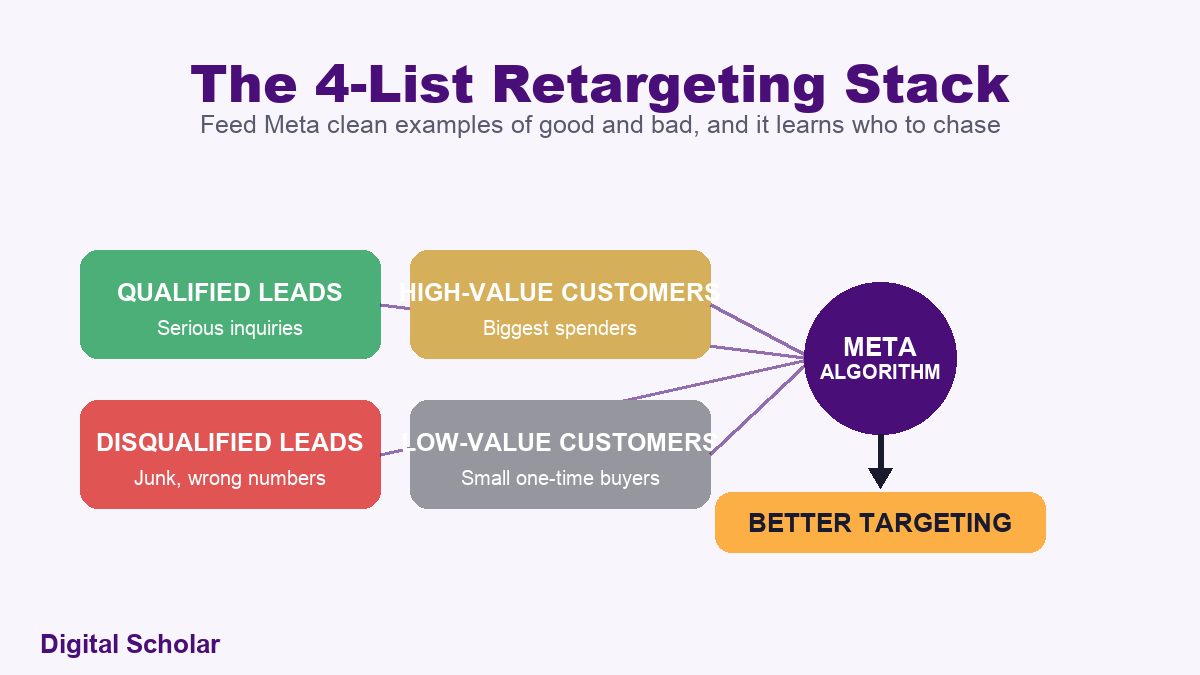
Your website pixel is only half the machine. The other half is your own customer and lead data, uploaded as custom audiences. This is the highest-leverage move in this entire guide, and almost nobody does it properly. I call it the 4-List Retargeting Stack, and it is exactly four separate CSV uploads.
- Qualified leads. People who inquired and looked serious. Meta studies them and finds more people like them.
- Disqualified leads. Junk, wrong numbers, tyre-kickers. Uploading them tells Meta to stop finding people like this. This list is as valuable as the first.
- High-value customers. Your biggest spenders, uploaded with their purchase value. Meta hunts for lookalike high-payers.
- Low-value customers. Small, one-time buyers. Useful for a separate cheap-offer message, and useful as a contrast signal.
Here is the part people miss. Uploading your disqualified list is not optional cleanup, it is active training. When you tell Meta “these people wasted my time,” the algorithm gets sharper about who it shows your ad to. When we uploaded Digital Scholar’s own qualified customer database into a stubborn university client’s account, the lead quality shifted from cheap junk toward serious buyers who could actually pay for a program, and the cost per qualified lead settled around Rs 300 instead of producing worthless leads at Rs 100.
A customer list does not have to mean only paying customers. Leads count too. The point is to hand Meta clean, labelled examples of good and bad so its machine learning has something honest to learn from. Bigger lists learn better. A list of 20 rows confuses the engine. A list of 500 to 1,000-plus rows teaches it something real.
Meta’s Own Retargeting Sources (Video, IG, Lead Forms)
Beyond your website and your CSVs, Meta lets you build audiences from activity that happened on Meta itself. You do not even need a pixel for these, which makes them perfect for service businesses and creators who send everything to Instagram.
Video-view audiences
You can build an audience of people who watched 3 seconds, 25 percent, 50 percent, 75 percent, or 95 percent of a video. The 95 percent viewers are pure gold. If a 30-second video gets 100,000 viewers, maybe 10,000 of them watch to 95 percent. Those 10,000 sat through your entire message. Retarget only them and your conversion cost drops hard. This pairs beautifully with the creative testing framework I use, because your best-retention video becomes your best retargeting seed.
Instagram and lead-form audiences
You can retarget people who visited your Instagram profile, followed you, saved a post, or sent a DM. My favourite is the “engaged with your account” option, because for a brand like Digital Scholar, 70 to 90 percent of our audience lives on Instagram, so this one segment is huge and cheap.
Then there are lead-form audiences, which are the most under-used of all. Meta lets you separate people who opened your instant form but did not submit from those who did. Remember my opening number: around 600 of every 1,000 leads ghost us. The “opened but did not submit” audience lets me go back to the people who almost gave me their details and try again with a different hook. If you are still setting up your first forms, my guide to lead generation ads on Meta covers the form build in full.
The Meta Signal Loop (Conversions API)
This is the advanced play, and it is what separates agencies from amateurs. The Meta Signal Loop is my name for the cycle where you continuously feed real-world outcomes back to Meta so the algorithm keeps getting smarter about who to find. The technical piece that carries the data is the Conversions API, or CAPI, which sends events server-to-server instead of relying only on the browser pixel.
Why it exists: Apple’s App Tracking Transparency and browser privacy changes broke a lot of pixel tracking, especially on iPhones. CAPI is how you plug the gap. The pixel catches what it can in the browser, and the server sends the confirmed truth (a real sale, a qualified lead, a refund) directly from your systems to Meta.
Here is how the loop runs at Digital Scholar in plain language, no code required to understand it:
- An ad drives a lead into our instant form.
- The lead flows into our Zoho CRM, tagged by source through a call-tracking IVR.
- Our team calls, and marks the lead qualified or junk.
- That status is sent back to Meta through CAPI in near real time.
- Meta retrains, finding more people like the qualified leads and fewer like the junk.
The honest cost picture: our Zoho CRM setup ran about Rs 1.5 lakh to configure plus a few lakh a year in seats, and virtual numbers through an IVR like Nolarity cost roughly Rs 1,000 to Rs 1,500 each. You do not need all of that to start. The minimum viable signal loop is a connected Google Sheet where you mark leads good or bad and push the status back. Tools like Stape.io make the server-side connection approachable for smaller businesses. If you want the full stack I recommend, I list it in my post on the best performance marketing tools and platforms.
The key insight: Meta cannot know if a lead was real unless you tell it. The Signal Loop is you teaching the algorithm the truth about your leads, over and over, until it stops guessing.
Building the Retargeting Campaign
Now you assemble everything into a live campaign. A retargeting campaign uses the same three-level structure as any Meta campaign (Campaign, Ad Set, Ad), but the magic happens in the audience section of the ad set. You have two moves: Include and Exclude.
Include: stack your warm audiences
For a pure retargeting campaign, choose a Leads or Sales objective, and in the audience section Include your custom audiences. I typically stack around five: my four customer lists plus my website pixel audience. This tells Meta to show the ad only to people who already know Digital Scholar. Small audience, warm intent, low cost per result.
Exclude: stop paying to reach buyers you already have
The Exclude move is just as important and almost always forgotten. On your cold prospecting campaigns, Exclude your existing customers and recent purchasers. There is no reason to keep paying to show a “buy now” ad to someone who bought yesterday. Excluding them sends your whole budget toward fresh prospects and quietly lowers your blended cost. This is also the fix for a scaling problem I explain in the next section.
A practical starting structure looks like this:
| Campaign | Objective | Audience move |
|---|---|---|
| Prospecting (cold) | Leads / Sales | Broad targeting, Exclude existing customers |
| Retargeting (warm) | Leads / Sales | Include website + engagement audiences |
| Retention (hot) | Sales | Include past buyers, cross-sell offer |
If you are deciding how to split budget across these, the same logic I use for CBO versus ABO in Meta ads applies: keep retargeting in its own ad set so its budget is protected and the cheap warm leads do not get starved by the algorithm chasing volume elsewhere.
Reading Performance Without Fooling Yourself
Retargeting numbers look amazing, and that is exactly why they lie to you. When you break your results down by audience segment, placement, and time, you will see some pockets that look unbelievably cheap. Before you pour your whole budget into them, understand two traps. (If you are unsure whether a number is good or bad in the first place, my guide to the 12 Meta Ads metrics that matter is the companion to this section.)
The assist trap
Think about football. The player who taps the ball into the net gets the goal, but the pass that set it up was the assist. Conversions work the same way. Someone might see your Instagram reel on Monday, your retargeting ad on Wednesday, and finally buy on Saturday from a Threads placement. Meta credits Threads, so Threads looks like a genius, but Facebook and Instagram did the real work of warming that person up.
I have seen a placement like Threads show 12 sales at around Rs 391 each and look like the cheapest channel on earth. If I had killed everything else and gone Threads-only, those sales would have evaporated, because nothing would have set them up. Do not isolate a single day, placement, or platform just because the last-click number looks pretty. The assist is invisible in the dashboard but real in your bank account.
The 15x ROAS scaling trap
Here is a trap that has burned many D2C founders. A retargeting campaign shows a beautiful 15x return on ad spend, so the owner triples the budget expecting three times the sales. Instead, sales barely move and the ROAS collapses. Why? That 15x was Meta re-serving your existing warm audience, which is a small, finite pool. Once you exhaust it, extra budget spills into colder, more expensive traffic and the average craters.
Retargeting is a ceiling, not an engine. It converts the demand you already created, and that demand is limited by how much cold prospecting and awareness you ran upstream. If you want more retargeting sales, you have to feed the top of the funnel first. This is also why I judge overall marketing efficiency across the whole account, not per channel. For the money side of that math, my breakdown of how to calculate break-even ROAS is the companion to this post.
To attribute real buyer journeys, I use a multi-touch tool. I run TrackCity on my course sales for roughly Rs 10,000, and I have seen individual buyers rack up 15, 29, even close to 90 ad touchpoints before they purchased. I previously paid for HYROS at 3,000 to 4,000 dollars a year and dropped it, because for my volume the cheaper tool did the job. That is the honest version. You do not need the most expensive attribution stack, you need one that shows you the assists.
What I Have Tested and Rejected
Not every retargeting idea survives contact with a real account. Here is what I have stopped doing, so you can skip the tuition fee.
- Retargeting every website visitor equally. I stopped this the day I realised our viral blog traffic was polluting the audience. Money page only.
- Chasing the cheapest placement. Threads and Audience Network sometimes show a Rs 391 or Rs 569 cost per result that tempts you to go all-in. It is an assist, not a hero. I keep them on, I do not build the account around them.
- Scaling a 15x retargeting campaign by budget alone. Learned this the hard way. The pool is finite. Feed the top of the funnel instead.
- Skipping the disqualified-leads upload. For a long time I only uploaded good leads. Uploading the junk list is what actually sharpened the targeting.
- A 365-day window for a course. Too long. People who researched a four-month program eight months ago have moved on. Thirty days keeps it fresh.
If you want to run this entire system in plain English from your terminal instead of clicking through Ads Manager, I built a workflow for exactly that, which I documented in using Claude Code for Meta ads. It is the same logic in this post, automated.
Want to build this whole system with your hands, not just read about it?
Our 4-month AI and Digital Marketing program at Digital Scholar teaches you to set up the pixel, the custom-audience stack, and the signal loop on live accounts, the same way we run them at echoVME. You leave able to do this for any brand.
Frequently Asked Questions
What is the difference between the Meta Pixel and the Conversions API?
The Meta Pixel is browser-based JavaScript that records what a visitor does on your website. The Conversions API (CAPI) sends events server-to-server, straight from your systems to Meta. The pixel is easier to set up but misses data when browsers or iPhones block tracking. CAPI plugs those gaps and confirms real outcomes like a completed sale or a qualified lead. Use both together. At Digital Scholar we run the pixel for browsing signals and CAPI to feed back verified lead quality.
How many days should my retargeting window be?
Match it to your buying cycle. For a course or info product, 30 days works because people decide fast. For D2C and e-commerce, 30 to 60 days covers cart recovery. For high-ticket items like real estate, use the full 180 days because buyers research for months. We default to 30 days at Digital Scholar and hold 180 days for our real estate clients. A window that is too long fills your audience with people who forgot you, which pushes your cost per result up.
Do I need a website to run retargeting ads?
No. A website and pixel are ideal, but Meta lets you retarget entirely from on-platform activity. You can build audiences from people who watched your videos, visited or followed your Instagram profile, engaged with your posts, or opened your lead form. For many service businesses and creators, these Instagram and video audiences are enough to start. Since 70 to 90 percent of our own audience is on Instagram, we lean heavily on the “engaged with account” audience even where the pixel exists.
Why do my retargeting ROAS numbers fall when I increase the budget?
Because retargeting spends against a finite warm audience. A 15x return often means Meta is re-serving the small pool of people who already know you. When you scale budget, that pool runs out and spend spills into colder, costlier traffic, so the average return drops. The fix is not more retargeting budget, it is more cold prospecting and awareness upstream to refill the pool. Retargeting is a ceiling on demand you created elsewhere, not an independent growth engine.
How is retargeting different from a lookalike audience?
Retargeting reaches people who already interacted with you. A lookalike audience reaches new strangers who resemble your best customers. They work together. You upload your qualified and high-value customer lists (retargeting seeds), and Meta uses them both to retarget those exact people and to build lookalikes of them for cold prospecting. The cleaner your customer lists, the better both jobs perform, which is why the 4-List Retargeting Stack in this guide powers your prospecting too.
Can one Meta Pixel track multiple websites?
You should use one pixel per website. Putting one pixel across several sites mixes unrelated audiences and muddies the data the algorithm learns from. At echoVME we keep one pixel per website across every account we manage. Digital Scholar, echoVME, and our other brands each have their own website and their own pixel. If you run distinct businesses, give each its own pixel inside your Business Manager so the audiences and events stay clean and separate.
Is Meta retargeting worth it for a small business in India?
Yes, and arguably more than for a big brand, because small budgets cannot afford waste. Retargeting is your cheapest, warmest spend. Even without a fancy CRM, you can start with a website pixel, an Instagram engagement audience, and a simple qualified-versus-junk lead list. That alone recovers a real share of the leads that would otherwise ghost you. Given that around 600 of every 1,000 leads never answer a first call, follow-up through retargeting is not optional, it is where the margin hides.
What should my first retargeting ad actually say?
Not “buy now.” A warm prospect saw you once and left, so the job is trust, not pressure. Lead with proof: a testimonial, a result, a founder’s face, an answer to the objection that likely stopped them. At Digital Scholar we retarget engaged audiences with student results and classroom clips before we ever quote a price. Save the discount and urgency for the hot audience of cart abandoners and past buyers, where a nudge is all that is missing.
Zoom out for a second. Retargeting is really just respect for the money you already spent. You worked hard and paid Meta to get someone to notice you. Letting them slip away after one visit is the most expensive mistake in performance marketing, and it is completely avoidable.
Do one thing today: install the Meta Pixel on your website and verify it fires with the Meta Pixel Helper. That single step turns Meta from blind to seeing. Everything else in this guide builds on it. If you want to go deeper on the platform overall, my guide on how to learn performance marketing maps the full path.
The pixel is watching. The audiences are waiting. Go set it up.