
In one of my recent Digital Scholar batches, I pulled up a live Google search for “digital marketing freelancer in Chennai.” Out of 10 results on page one, 5 of them were my students’ websites. Digital Sidesh. Arvind Subramaniam. Srinathi. Kaushik. Hanish Adrian. Five students, same keyword, same page, same position on Google.
Every single one of them followed the exact same on-page SEO checklist you are about to read.
That is the power of on-page SEO done right. And the best part? I have been doing this for echoVME for the past 12 years. The keyword “digital marketing agency in Chennai”, whenever you search, echoVME is coming on the top. 12 years. Never went down. One reason: consistency in on-page SEO. The same echoVME framework is what I teach at Digital Scholar, and what you are about to read here.
In this post, I will walk you through the 6 on-page SEO techniques every home page must have, the 3 plugins you need to install before you touch anything, the EEAT framework Google uses to decide who ranks first, and the 10-factor blog SEO checklist I teach inside Digital Scholar. Every example here is real. Every number here is tested.
- What Is SEO in One Word?
- 3 Types of SEO You Must Know
- 3 WordPress Plugins to Install Before You Start
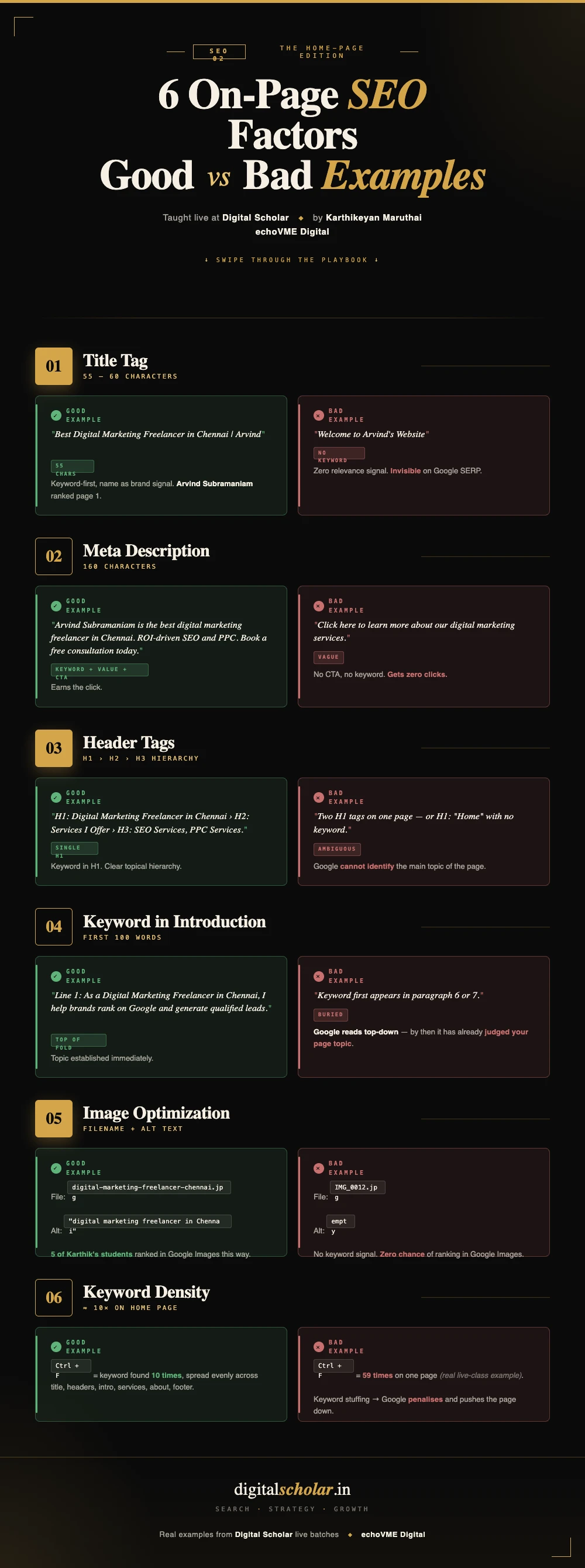
- The 6 On-Page SEO Techniques for Home Page
- Factor 1: Title Tag (60 Characters)
- Factor 2: Meta Description (160 Characters)
- Factor 3: Header Tags (H1, H2, H3)
- Factor 4: Keyword in Introduction
- Factor 5: Image Optimization
- Factor 6: Keyword Density
- EEAT: The Hidden Ranking Factor Google Looks For
- Blog SEO: 4 Extra Factors Beyond the Homepage
- The 21-Content Strategy: How to Build Authority Fast
- Frequently Asked Questions
What Is SEO in One Word?
Every time I ask this question in class, I get different answers. Visibility. Optimization. Keywords. All of them are related, but none of them are the answer I am looking for.
SEO in one word is ranking.
How do you rank your website when people search for something? How do you rank your content on ChatGPT, on Claude, on Google Images? The entire process of making your content appear on top when people search for something, that is SEO. Everything else is just a part of that process.
I started my career in 2008. From day one, the goal has always been the same: ranking. The tools have changed. The execution has changed. But the goal never changed.
The key insight: SEO is not a one-time job. I have been optimizing echoVME for 12 years for the keyword “digital marketing agency in Chennai.” The moment I stop, a competitor is ready to take my position. Consistency is what keeps you on top, not one-time optimization.
3 Types of SEO You Must Know
Before we go into the on-page SEO techniques for home page, let me give you the full picture. The entire SEO process breaks down into 3 types:
| SEO Type | What It Covers | Example Tasks |
|---|---|---|
| Technical SEO | Setting up and making the website ready | Domain setup, hosting, website creation, speed optimization |
| On-Page SEO | Optimizing content on the website | Title tag, meta description, header tags, keyword density, images |
| Off-Page SEO | Building authority from outside the website | Backlinks, Reddit, LinkedIn Pulse, Medium articles |
You need all three. Skipping one is like building a house with two walls. Today, our focus is on-page SEO, specifically the home page, because this is the most important page on your website. If you are curious about how digital marketing careers are shaping up in India, check out my post on digital marketing salary in India for the full picture.
Here is the reality: 100 businesses create websites. Only 10 come on the top. Why? Because only those 10 optimized their content. The ones who are already on page one, they optimized their pages. If you want to beat them, you need to optimize better than them. That is the entire game of on-page SEO.
3 WordPress Plugins to Install Before You Start On-Page SEO
You cannot do proper on-page SEO on a WordPress website without these 3 plugins. Install and activate all 3 before you touch anything on your home page.
| Plugin | Purpose | Why It Matters |
|---|---|---|
| Rank Math SEO | On-page SEO optimization | Gives you a score (0-100) for every page. Shows exactly what is missing. Target: 80+ |
| LiteSpeed Cache | Website performance | Improves page speed, a core technical SEO factor. Usually pre-installed by your hosting provider. |
| Table of Content Plus (TOC+) | Blog SEO and user experience | Automatically adds a clickable table of contents to blog posts. Helps Google understand your content structure. |
After installing Rank Math, go to the Rank Math menu in your dashboard, click Skip Setup, then Return to Dashboard. That is it. One-time process. From now on, every page and post will show you a Rank Math score in the top right when you edit it. A score below 70 means the page is not optimized. Aim for 80 and above.
I showed my students this in class: my demo website started at a score of 11. After entering the focus keyword and applying the 6 techniques below, it jumped to 81. Same page. Same content structure. Just proper optimization.
The 6 On-Page SEO Techniques for Home Page
These are the 6 factors I have been using since 2008. The tools to implement them have evolved, but the factors themselves have not changed. Every one of my Digital Scholar students applies these 6 to their home page before we move to anything else.
| # | Factor | Limit / Rule | Where to Apply in WordPress |
|---|---|---|---|
| 1 | Title Tag | Max 60 characters | Rank Math Edit Snippet |
| 2 | Meta Description | Max 160 characters | Rank Math Edit Snippet |
| 3 | Header Tags | 1 H1, multiple H2/H3 | Divi Visual Builder |
| 4 | Keyword in Introduction | First line of first paragraph | Divi Visual Builder / Page Editor |
| 5 | Image Optimization | File name + alt text = keyword | Media upload and Divi image block |
| 6 | Keyword Density | 10 times on home page | Page content editor |
Factor 1: Title Tag (60 Characters)
When someone searches “digital marketing freelancer in Chennai” on Google, you see a list of results on the SERP, the Search Engine Results Page. The big, bold, clickable text for each result is called the title tag.
Every result I showed my students that day had one thing in common: the keyword “digital marketing freelancer in Chennai” was right there in the title. Because when Google sees that your page title contains the exact keyword someone searched for, it understands that your page is relevant to that search.
Here is how to write a title tag for your home page:
- Your primary keyword must be in the title
- Keep it to exactly 55 to 60 characters, not more
- If you have space left after the keyword, add your name or brand name with a pipe separator (|)
Example: My keyword is “Best Digital Marketing Freelancer in Chennai.” That alone is 44 characters. I still have space. So I add “| Karthik” to make it 55 characters total. Look at how Arvind Subramaniam does it on his website, “Best Digital Marketing Freelancer in Chennai | Arvind.” That is a perfectly structured title tag.
One important rule: every page on your website gets one unique keyword. Never use the same keyword for two different pages. Think of it this way, if you have 3 babies and give all 3 the same name, nobody knows who you are calling. The same confusion happens in Google’s index. One page. One keyword. No exceptions. And when it comes to blog posts, the title is where that keyword has to lead. I have written a full guide on blog post title ideas that rank on Google if you want to go deeper on this.
The key insight: Title tag is the single most important on-page SEO factor. If your title tag is wrong, nothing else matters. If your title tag is right and competition is low, the page will come on top even without the other 5 factors being perfect.
Factor 2: Meta Description (160 Characters)
Below the title tag on every Google result, you see two lines of text. That is the meta description. It does not directly rank your website, but it determines whether people click on your result or scroll past it.
Character limit: 160 characters maximum. Go beyond 160 and Google cuts the sentence mid-way with “…”, which looks incomplete and untrustworthy. People see an unfinished sentence and skip your result.
When I searched “digital marketing freelancer in Chennai” and looked at the top results, here is what I found. Some results had complete, optimized descriptions: “Arvind Subramaniam is the best digital marketing freelancer for ROI-driven SEO and PPC. Book your consultation today.” That is a perfect meta description. It has the keyword. It has a specific value proposition. It ends with a CTA, Call to Action.
Other results showed cut-off sentences. Half a thought, then “…” People do not click those.
| Element | Title Tag | Meta Description |
|---|---|---|
| Character Limit | 60 characters max | 160 characters max |
| Must Include | Primary keyword | Primary keyword + CTA |
| Where It Shows | Bold clickable text on SERP | Two-line description below the title |
| Direct Ranking Impact | Very high | Indirect (through CTR) |
| Ideal Range | 55 to 60 characters | 150 to 160 characters |
The formula for meta description: [Business/Person name] is one of the best [keyword]. With [experience/credential], [value proposition]. [CTA, Book a consultation / Get a free audit / Contact today].
Factor 3: Header Tags (H1, H2, H3)
There are 6 header tags in HTML: H1 through H6. In practice, you need only 3. H4, H5, and H6 exist but you will almost never have content deep enough to need them. Rank well with H1, H2, and H3.
Here is how they work:
- H1 = The main title of the page. What is this entire page about? Only one H1 per page. Always.
- H2 = A sub-topic that supports the main topic. Multiple H2s are fine.
- H3 = A sub-point within the H2 section above it.
The rule that never changes: One page gets exactly one H1. That H1 is the father of the family. Everything else reports to it.
I showed this to my students with a real demo. On my website, the main topic, “Best Free Digital Marketing Freelancer”, is the H1. Below it, I have “What are all the services I offer?” That comes under the main topic, so it is an H2. Below that, I list the individual services, each one is an H3 because it is a sub-point of the H2 above it.
And here is the most important part, your keyword must appear in your header tags. Look at my demo website: “Digital Marketing Freelancer in Chennai” is in the H1. A variation appears in the H2. Another variation appears in the H3. Google reads these headers to understand what your page is about. If your keyword is not in your headers, Google misses the signal.
| Header Tag | How Many Per Page | What It Should Contain | Example |
|---|---|---|---|
| H1 | Only 1 | Main keyword + page topic | Best Digital Marketing Freelancer in Chennai |
| H2 | Multiple (depends on layout) | Sub-topic supporting H1 + keyword variation | Why Hire a Digital Marketing Freelancer? |
| H3 | Multiple (depends on list items) | Sub-point under the H2 above it | 1. SEO Services | 2. Social Media Marketing |
Factor 4: Keyword in Introduction
The first paragraph of text on your home page, the description below your H1, must contain your primary keyword in the very first line. Not in the third sentence. Not somewhere in the middle. The first line.
Google reads your page from top to bottom. The sooner it finds your keyword, the faster it understands what your page is about. This is also a signal to the reader: they searched for something specific, they landed on your page, and the first sentence confirms they are in the right place.
For a digital marketing freelancer website, the opening line could be: “As a Digital Marketing Freelancer in Chennai, I help brands grow their organic traffic, generate leads, and rank on the first page of Google.” The keyword is there. The context is there. The value is there.
This is also where EEAT starts to show. The content here should talk about your experience, your credentials, your specific results. “I’m certified from Digital Scholar” tells Google something. Google already knows Digital Scholar is a reputed digital marketing institute. Saying you are certified from a credible institution immediately builds trust for your page.
Factor 5: Image Optimization (File Name + Alt Text)
Every image you upload to your website is an opportunity to rank. Not just in web search, in Google Images as well. And this is one of the fastest-ranking opportunities available to you.
I told my Digital Scholar students: search “digital marketing freelancer in Chennai” on Google Images. The images that come up, most of them belong to my students. Not because they are better photographers. Because they named their files correctly and added the right alt text. We apply the same image SEO technique for every echoVME client website and it consistently delivers ranking improvements in Google Images within 2-4 weeks.
Two things to do for every image, no exceptions:
- File name: Before uploading, save the image with your keyword as the file name. Example:
digital-marketing-freelancer-in-chennai.jpg. Use hyphens, all lowercase, no spaces. - Alt text: When you upload the image in WordPress, you see an “Alternative Text” field. Enter the exact same keyword there. “digital marketing freelancer in Chennai.”
That is all. Two steps. If you do this tonight and check Google Images in 7 days, there is a very high chance your image will start appearing for your target keyword. I have seen this happen with students within 3 to 7 days of doing it correctly.
For your home page, use at least one real image, a photo of yourself or your work, not a stock image. Real images build more credibility with visitors and with Google. If you are building a website for a clothing brand, use real product photos. If it is a personal brand, use your own photo.
Factor 6: Keyword Density (10 Times on Your Home Page)
Keyword density is how many times you use your primary keyword across the entire page. More does not always mean better, there is a right range, and there is a range that works against you.
In class, I opened a live website and pressed Ctrl+F to search for the keyword. One site had used it 18 times. Another had used it 59 times. 59 times on one page, that is what we call keyword stuffing, and Google does not like it. The ideal number for a home page is 10 times on average.
Here is the math: Your title uses the keyword (1 time). Your H2 and H3 use it (2-3 times). Your intro paragraph uses it (1 time). That is already 4 to 5 repetitions without trying. You need to subtly add the keyword 5 to 6 more times across your remaining content, in service descriptions, in testimonial sections, in your about section.
The rule: your keyword should be spread evenly throughout the page. Equal distance between repetitions. Never stuffed into one paragraph. Your content should read naturally to a human, the optimization should be invisible.
| Page Type | Target Keyword Density | Example |
|---|---|---|
| Home page | 10 times average | 1000 words page: use keyword 10 times |
| Blog post (1000 words) | 0.5% to 1% = 5 to 10 times | Use keyword 5 to 10 times |
| Blog post (2000 words) | 0.5% to 1% = 10 to 20 times | Use keyword 10 to 20 times |
| What to avoid | Above 1% = keyword stuffing | 59 times in 2000 words is too much |
EEAT: The Hidden Ranking Factor Google Uses to Decide Who Wins
Imagine 20 Digital Scholar students all targeting the same keyword, “digital marketing freelancer in Chennai.” All 20 follow the 6 on-page factors. Whose website will rank first? Google needs a way to decide. That decision comes from EEAT. At echoVME, we apply EEAT principles for every single client, from Casagrand to Naturals to The Hindu. This is the same framework that has kept top digital marketing consultants in India visible on Google year after year.
EEAT stands for Experience, Expertise, Authoritativeness, and Trustworthiness. These are the four signals Google looks at when determining which page in a competitive SERP deserves position one.
| EEAT Factor | What Google Looks For | How to Show It on Your Website |
|---|---|---|
| Experience (E) | Do you have real-world experience in this field? | List the services you offer. Add client case studies. Say “I’m certified from Digital Scholar.” Mention years of experience. |
| Expertise (E) | Do you have in-depth knowledge about this subject? | Write 7 blog posts on your topic from different angles. If you keep talking about the same subject in depth, Google sees you as an expert. |
| Authoritativeness (A) | Are you consistently active and recognized in your space? | Consistently publish content. One month of content is not authority. 12 months of consistent publishing builds authority. |
| Trustworthiness (T) | Can people trust your website? | Create a Contact Us page with your phone number, email, and WhatsApp. This is the simplest trust signal you can add. |
Let me give you the best example of EEAT in action. Why does everyone believe Rishi Jain is the best AI digital marketer in India? Because he keeps talking about only AI in digital marketing, consistently, from different angles, across multiple platforms. That consistency built his expertise signal. Google noticed. His audience noticed. That is exactly how EEAT works.
For the trustworthiness factor, here is a simple test. If you see a new e-commerce website offering 70% discount on all products, no contact number, no WhatsApp, no support email, do you buy? Of course not. But if that same website says “Any problem with your order? Call us here. Or chat with us. We guarantee a refund within 24 hours”, you believe them. That contact information is what makes your website trustworthy. Add a Contact Us page. Keep it in your main navigation. It is one of the simplest ways to improve your EEAT score.
Blog SEO: The 4 Extra Factors Beyond the Home Page
The 6 home page factors apply to blog posts as well. But blog posts need 4 additional factors. These 4 extras are what separate a blog post that ranks from one that disappears.
Quick clarification before we start: On a blog post, the post title itself is automatically the H1. You do not need to manually set an H1 inside the post content. Start your content sections with H2 tags. The post title handles the H1.
Extra Factor 1: Permalink Optimization
The permalink is the URL of your blog post. When Rank Math auto-generates it, it often includes numbers, years, stop words, and extra text that you do not need. Clean it up before publishing.
Rules for a clean permalink:
- No numbers (avoid “top-10” or “7-ways” in the URL)
- No year (do not use “2026” in the URL, this makes your post look outdated next year)
- No uppercase letters (all lowercase always)
- No spaces (use hyphens to separate words, not underscores or spaces)
- Should match your focus keyword (if your keyword is “digital marketing freelancers in Chennai,” your URL should be /digital-marketing-freelancers-in-chennai/)
Extra Factor 2: Content Quality
Blogging at its core is documenting your experience in text format. Not copying. Not paraphrasing. Documenting, sharing what you have actually done, seen, and tested. I tell my students: the same way a vlogger records a video of their experience, a blogger writes about theirs.
This means your blog content should be original. Your content should be error-free and grammatically correct. It should provide real value, something a reader cannot find by reading 5 other articles on the same topic.
Using AI tools like ChatGPT to draft the content is fine, but you need to bring your own experience into it. If you are writing about clothing for women in Chennai, add your personal picks, add your knowledge of Chennai fashion trends, add something that only you can say. That is what makes content worth ranking. I use a stack of specific AI tools across my echoVME work, all covered in my post on the best AI tools for digital marketing.
Extra Factor 3: Text Formatting (Bold and Italic)
When you paste content from ChatGPT into WordPress, it often comes as plain text, no formatting at all. You need to add formatting manually. This is called text formatting, and it serves two purposes: it helps Google understand what is important on your page, and it makes the content more readable for visitors. If you want to go deeper on using Claude specifically for your SEO and digital marketing workflows, read my post on Claude AI for digital marketing.
The minimum standard: 2 times bold and 2 times italic for your primary keyword throughout the blog post. Select the keyword text and click Bold (or press Ctrl+B). Do the same for italic. More is fine, but 2 of each is the minimum.
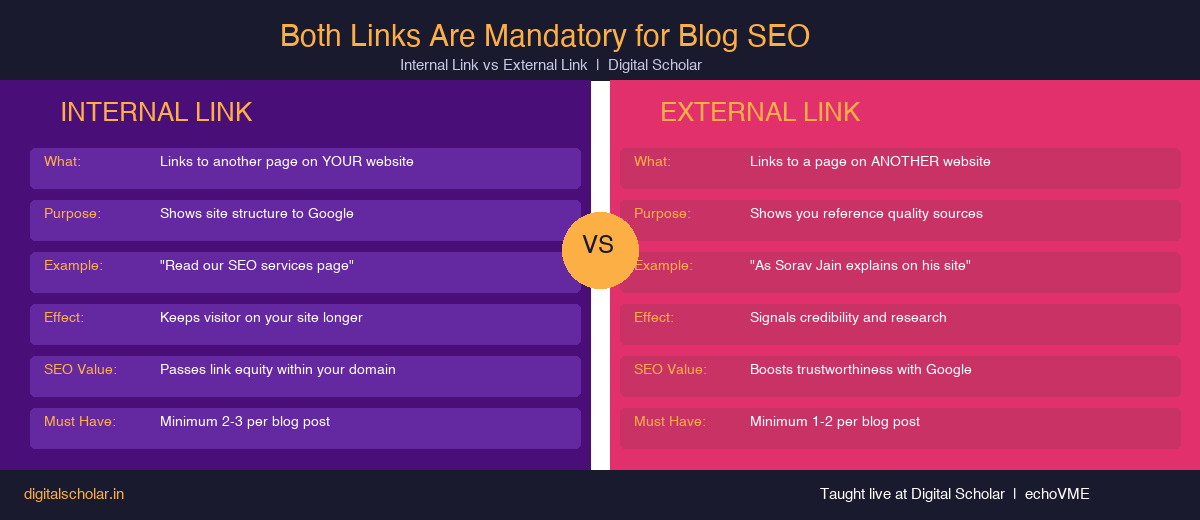
Extra Factor 4: Internal and External Links
Every blog post needs at least one internal link and at least one external link.
Internal link: A link from your blog post to another page on your own website. If I write a blog “Top 10 Digital Marketing Freelancers in Chennai,” I put myself in position one and link to my contact page. The reader clicks the link and stays on my website. They never left. That is an internal link. It keeps people on your site and signals to Google that your pages are connected.
External link: A link from your blog post to another website. In that same “Top 10” post, if I mention Sorav Jain in position two and link to his website, that is an external link. The reader goes to a different website. External links show Google that you are providing references and additional value to your readers, not just self-promotional content.
The 21-Content Strategy: How to Build Topical Authority Fast
Here is a strategy I give every Digital Scholar batch. You have 7 blog topics for your main keyword. Now, instead of publishing all 7 only on your own website, you publish 3 versions of each topic across 3 platforms. That gives you 21 content pieces from 7 topics.
| Platform | Content Version | Number of Posts | Notes |
|---|---|---|---|
| Your WordPress website | Version 1 (original) | 7 posts | Full on-page SEO with all 10 factors applied |
| LinkedIn Pulse | Version 2 (different angle) | 7 articles | Same topic, completely rewritten. Upload same image. Takes 2-3 minutes each. |
| Medium.com | Version 3 (different angle) | 7 articles | Same topic, third version. Medium has strong domain authority, your article can rank fast. |
One of my online students, Nagas Risha, whose keyword is “Best Digital Marketing Freelancer in UAE,” started publishing on LinkedIn Pulse before most others in her batch. She was already posting there by April 2026. Multiple articles, same keyword, different angles. That is the strategy in action. For a complete example of how to use AI to speed up this content process for Instagram, read my guide on Instagram audit using AI.
Why does this work? Because whether it is your website, your LinkedIn profile, or your Medium article that shows up on page one, it is still your content, your name, your keyword. You are working on the EEAT framework simultaneously across three platforms. Google sees consistent publishing. Your audience sees consistent publishing. Authority builds.
The car driving analogy applies perfectly here. The first blog post takes the most time. But once you know the process, you can replicate it 21 times without thinking twice.
Frequently Asked Questions on On-Page SEO Techniques for Home Page
1. How many keywords can I target on my home page?
Only one. One page, one keyword. This is not a guideline, it is a rule. If you use two different keywords on the same page, you confuse Google’s indexing system. Think of it as naming a baby. You would not give one baby two names expecting both to work. Pick one primary keyword for your home page and optimize everything around it.
2. How many H1 tags should a page have?
Exactly one. Every page on the internet, no matter the size or the number of sections, starts with one main topic. That is your H1. After that, only H2 and H3 tags. If you ever see a page with multiple H1 tags, that page is not properly structured for SEO.
3. What should my Rank Math score be?
Aim for 80 and above. Anything above 70 is technically good, but 80 to 100 is where you want to be. In my demo, the page started at 11 because there was no focus keyword entered. After entering the keyword alone, it jumped to 76. After optimizing the meta description, it hit 81. The score responds directly to your on-page work.
4. Can I use the same keyword on my home page and my blog posts?
You can use related keywords but not the exact same keyword. If your home page keyword is “digital marketing freelancer in Chennai” (singular), a blog post can target “digital marketing freelancers in Chennai” (plural). Small variation, different page, different intent. But using the identical keyword on 7 blog posts is a mistake, each post competes against the others and Google does not know which one to rank.
5. How fast will my image rank on Google Images after optimization?
If you do the image file name and alt text correctly today, in most cases with low to medium competition keywords, your image can start appearing in Google Images within 3 to 7 days. I tell my students: do it tonight and check back before the next class. Most of them come back with screenshots of their image ranking.
6. What is the difference between a featured image and an OG image?
The featured image (size: 810×540 for most blog themes) is what appears at the top of your blog post on your website. The OG image (Open Graph image, size: 1200×630) is what appears when someone shares your website link on social media, WhatsApp, Twitter, Facebook, LinkedIn. Both need your keyword in the file name and alt text. You can use the same design for both, just export in the different sizes. Use Canva’s custom size option to create both.
7. How many blog posts do I need to build topical authority?
A minimum of 7 blog posts per keyword cluster. This is the number I have consistently seen build enough topical authority to start ranking. If you are targeting a second keyword cluster, for example, your home page is “best jewelry shop in Chennai” and you also want to rank for “best gold jewelry shop in Chennai”, you need 7 more posts for that cluster. 7 is the minimum. Keep going beyond that and your authority compounds over time.
8. Can my blog post rank for a keyword my home page is already targeting?
Not for the same exact keyword. But this is where the strategy gets interesting. If your home page targets “digital marketing agency in Chennai,” a blog post can target “best digital marketing agency in Chennai” or “top digital marketing agencies in Chennai.” Different enough for Google to treat them separately, related enough to build authority in the same cluster. Think about what a user would actually type when searching at different stages of their decision-making process. For a complete breakdown of how AI is changing what gets you rankings, see my post on AI tools for digital marketing in 2026.
If you want to see how on-page optimization works on an actual course landing page, the Digital Marketing Course in Chennai page is a good real-world reference.
Ready to Apply This Inside a Live Mentorship?
Everything I covered in this post is what I teach in my live Digital Scholar batches. The 6 on-page factors, the EEAT framework, the 21-content strategy, and the full AI workflow that automates most of this process. The same methodology drives echoVME’s client results: 20M+ organic sessions, 10,000+ keywords ranked, clients like Casagrand, Naturals, and The Hindu. 3,000+ students trained at Digital Scholar. Learn it directly from the practitioner, not a textbook.